 Daily Dash
Reminders you can type the way you think
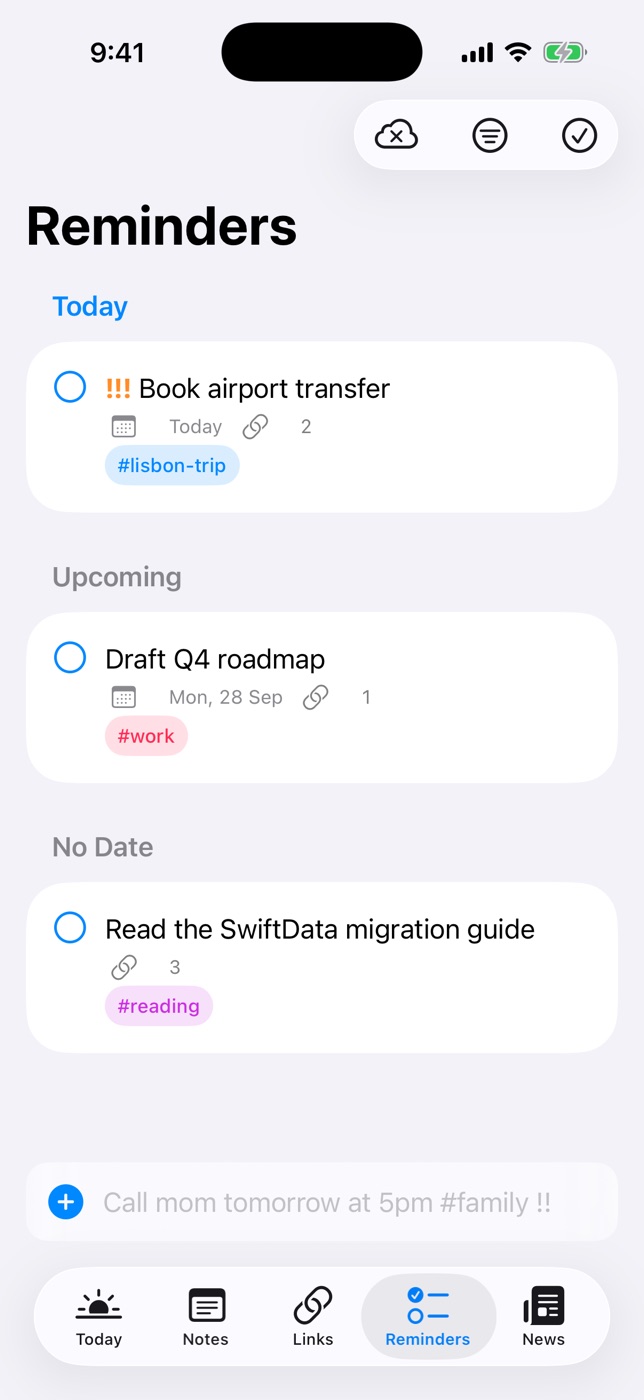
Daily Dash has its own reminders alongside Apple Reminders. Type a sentence and quick add pulls out the date, time, priority, tags and even the place. Reminders can alert when you arrive or leave, ring like an alarm, and alert on every device you own.
Natural language quick add
Type into the field at the bottom of the Reminders tab. A live preview shows what was understood before you save, and anything recognised is removed from the title.
| You type | You get |
|---|---|
| Call mom tomorrow at 5pm #family !! | Tomorrow 5:00 PM, tag family, medium priority |
| Submit expenses next Friday | Next Friday |
| Check the oven in 20 min | 20 minutes from now |
| Take out the bins tonight | Today at 8:00 PM |
| Stretch this afternoon | Today at 2:00 PM (morning 9 AM, evening 6 PM) |
| Standup at 10 | 10:00 AM. A bare 8–11 means morning, 12–7 means afternoon |
| Renew passport !!! | High priority, no date |
| Buy milk when I leave work | Alerts as you leave your saved place “Work” |
Priority is ! low, !! medium, !!! high. Anything you type without a date or place is due today. A reminder with a date but no time alerts at 9 AM. Tap any reminder to set the date, time, priority, tags, connections or place by hand.
Location-based reminders
Some things only make sense in one place. Open a reminder, choose At a Place, then pick a saved place, use your current location, or search and drop a pin on the map. Drag the radius to set how big “there” is, and choose Arriving or Leaving.
Tick Save to My Places for places you use often, like Home, Work or the gym. Saved places sync through iCloud, and quick add knows them by name: “when I get home”, “when I leave work”, “at the gym”.
- iOS watches the place for you, so Daily Dash doesn't need to be running.
- A location reminder alerts every time you arrive or leave until you mark it done.
- iOS allows 20 monitored places, so Daily Dash keeps the 20 nearest.
- Macs can't trigger by location, but a reminder you set on a Mac alerts on your iPhone or iPad.
For setup tips and troubleshooting, read location-based reminders on iPhone: the complete guide or the guide section on places.
Ring as Alarm
Some reminders can't be a quiet banner. Turn on Ring as Alarm for a timed reminder and it rings like a Clock alarm, through silent mode and Focus. It works on iPhone and iPad. On a Mac the same reminder arrives as a normal notification. Every reminder alert is Time Sensitive, so it gets through Focus modes you allow.
Alerts on every device
Reminders sync through your private iCloud, and each device schedules alerts from them. Add one on your Mac and it still alerts on your iPhone. Apple Reminders show up on Today and in the brief too, and ticking one off in Daily Dash marks it done in the Reminders app.
In the Reminders tab, reminders are grouped into Overdue, Today and later. Use Filter by Tag to narrow the list, Show Completed to see what's done, and swipe to edit or delete. Daily Dash reminders don't repeat, so keep recurring chores in Apple Reminders, where they'll still appear on Today.
When settings would stop an alert
If notifications, alarms or location access are off, Time Sensitive is disabled, or banners and sound are turned off, the Reminders tab tells you what to change and has a button that opens Settings. You find out before a reminder fails to fire.

Reminders that fire at the right moment
Daily Dash is coming soon to the App Store for iPhone, iPad, Mac and Apple Watch. It needs iOS 26 and later, iPadOS 26 and later, macOS 26 and later, or watchOS. No account, no ads, no analytics. Read the reminders guide →
FAQ
Can I set a reminder for when I leave work?
Yes. Type “buy milk when I leave work” in quick add, or open a reminder, choose At a Place, pick Work and choose Leaving.
Do location reminders work on Mac?
Macs can't trigger alerts by location. Set the reminder on your Mac and it will alert on your iPhone or iPad.
Can a reminder ring like an alarm?
Yes, on iPhone and iPad. Turn on Ring as Alarm for a timed reminder and it rings through silent mode and Focus. On a Mac it arrives as a normal notification.
Do Daily Dash reminders repeat?
No. Daily Dash reminders are one-off. Recurring reminders in Apple Reminders still appear on Today and can be ticked off there.