Blog › Productivity
How to stop forgetting things: a simple system that sticks
You meant to reply to that email. You meant to buy batteries. You definitely meant to call the dentist back. If you keep forgetting things, the answer usually isn't a better memory. It's a better system, one that catches a thought the second you have it and hands it back at the moment you can act on it. Here's a four-part system you can set up in an afternoon.
Why you forget (it's not what you think)
There are two kinds of remembering. One is recalling facts: a name, a date, where you parked. The other is remembering to do something in the future: pick up the prescription, text your sister back, bring the form on Thursday. Most of the frustrating forgetting in daily life is the second kind.
Your brain is good at noticing that something needs doing. It's bad at holding that thought for six hours and then surfacing it at exactly the right moment, especially while you're juggling work, family and a phone full of notifications. The thought pops up in the shower, when you can't act on it, and vanishes by the time you can.
So stop asking your head to be a to-do list. Every working system for not forgetting, from pilots' checklists to the “Getting Things Done” method, does the same four things:
- Capture the thought immediately, outside your head.
- Trigger it at the time or place where you can act.
- Keep it in one place you trust.
- Review that place every day.
Skip any one and things start slipping through again. Let's set up each.
Step 1: Capture in under five seconds
The single biggest reason people forget is that writing something down feels like too much effort in the moment. You tell yourself you'll remember. You won't. The rule is simple: if it takes more than a few seconds to capture, you won't do it consistently.
That means your capture tool has to be:
- Always within reach. For most people that's the phone. A notebook works if it's genuinely always on you.
- One step from open. Put the app in your dock, or on the Action button if your iPhone has one.
- Forgiving. You shouldn't have to choose a list, a date picker and a priority before saving. Capture first, organise later.
The best capture tools let you type the way you'd say it and work out the details. In Daily Dash, the quick-add field at the bottom of the Reminders tab reads plain English:
| You type | You get |
|---|---|
Call the dentist tomorrow at 10 | “Call the dentist”, tomorrow at 10:00 AM |
Check the oven in 20 min | An alert 20 minutes from now |
Take out the bins tonight | Today at 8:00 PM |
Submit expenses next Friday #work | Next Friday, tagged work |
Renew passport !!! | High priority, no date yet |
A live preview shows what was understood before you save, and the recognised bits are stripped from the title so your list stays readable. One line, one tap, back to your day.
Step 2: Trigger at the right moment
A reminder that fires when you can't act on it is almost as bad as no reminder. You swipe it away, and now your brain has learned that reminders can be ignored.
Before you set an alert, ask one question: when is the first moment I can actually do this? The answer is usually one of two things.
A time
Good for anything tied to the clock: calls during office hours, a deadline, “leave for the airport”. Be specific. “This afternoon” is better than nothing, but “Tuesday at 2” is better than “this afternoon”. Daily Dash understands both: a bare “this afternoon” becomes 2 PM, “this evening” 6 PM, “tonight” 8 PM.
A place
Most errands aren't tied to a time at all. They're tied to where you are. Buying milk only matters on the way home. Returning a borrowed charger only matters at the office. For these, a location reminder is far more reliable than any clock time.
Once you've saved places like Home and Work in Daily Dash, you can write them in the same quick-add line:
Buy milk when I leave workWater the plants when I get homeLog my weights at the gym
iOS watches the place for you, so the app doesn't need to be open. We've written a full guide to location-based reminders if you want to go deeper.
Make the important ones impossible to miss
A banner is easy to miss when your phone is in a bag. For the few reminders that genuinely can't slip, like medication, a school pickup, or a parking meter, turn on Ring as Alarm in the reminder's details on iPhone or iPad. It rings like an alarm instead of showing a banner.
Step 3: One trusted place
If tasks live on sticky notes, in three apps, in your email inbox and in a text you sent yourself, you don't have a system. You have a scavenger hunt. The goal is one place you trust to hold everything, so your brain can let go.
That doesn't mean everything has to be in one app. It means you look in one place. Plenty of people already have repeating tasks in Apple Reminders (“pay rent on the 1st”, “change the water filter every 3 months”) and appointments in their calendar. Moving all of that is a waste of an afternoon.
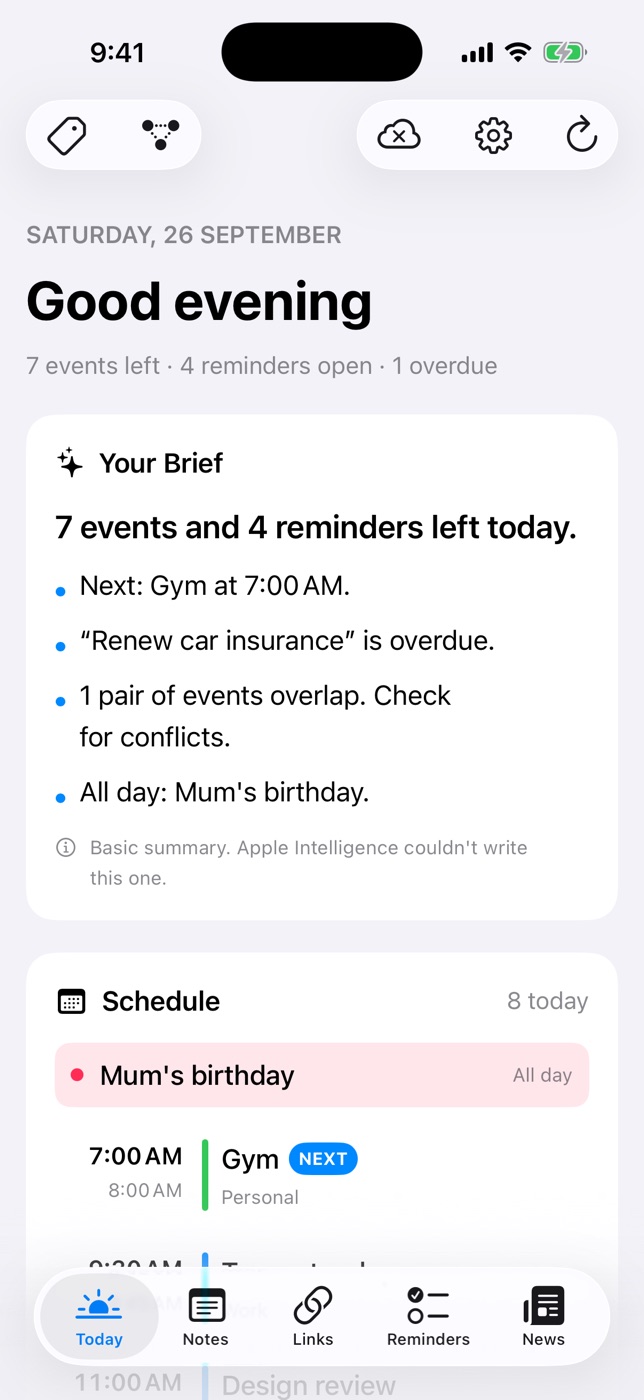
Daily Dash was built for exactly this. Its Today screen shows your calendar events, your Apple Reminders and Daily Dash's own reminders together, plus a short brief of what matters: what's next, what's overdue, and which events overlap. Keep your repeating chores in Apple Reminders if you like; they still show up on Today, and you can tick them off right there.
Tags help the one place stay tidy without adding folders. Tag a reminder #family and the same tag works on notes, links and calendar events, so tapping it later shows everything related in one view.
Step 4: A two-minute daily review
Capture and alerts get you most of the way. The review is what makes the system trustworthy. Once a day, ideally first thing in the morning, spend two minutes looking at everything:
- Read what's due today and what's overdue. Tick off anything already done.
- Give undated items a moment. Anything captured without a date either gets a time or place, gets done now if it takes under two minutes, or gets deleted.
- Look at the schedule. Spot clashes before they bite, and notice gaps where errands fit.
That's it. Daily Dash's brief does the first pass for you: a few lines written on your device by Apple Intelligence, calling out your next event, overdue items and overlapping meetings. Read it with your coffee and you've done most of the review before you've unlocked your laptop. If you want a longer ritual once a week, try our weekly review template.

A capture system that fits in one screen
Daily Dash gives you plain-English quick add, reminders that fire when you arrive or leave, and a morning brief of everything on your plate. Your data stays in your own iCloud. See how reminders work →
Small habits that close the gaps
With the system in place, a few habits catch what's left:
- Say it, then save it. When you promise someone something (“I'll send you that link”), capture it before the conversation ends. Promises are the easiest thing to forget and the most costly.
- Give every object a home. Keys, wallet and headphones go in the same spot every time. Physical forgetting is solved by places, not reminders.
- Leave things in your path. The parcel to return goes by the front door, on top of your shoes. Your environment is a reminder too.
- Close loops before leaving. A short “leaving home” check (window, stove, charger) turns worry into a habit. A location reminder on leaving Home works well here.
- Keep reference in notes, not reminders. A gate code or a flight number isn't a task. Put it in a note, tag it, and connect it to the reminder or event it belongs to.
- Prune ruthlessly. If a reminder has been overdue for two weeks, it's not happening. Delete it or reschedule it honestly. A list full of dead tasks is a list you stop trusting.
None of these require willpower. That's the whole idea: move the job of remembering out of your head and into a system that does it better.
FAQ
Is forgetting things a sign of a bad memory?
Usually not. Most everyday forgetting is about intentions, things you meant to do later, and working memory isn't built to hold those for hours. An external system handles most of it. If forgetting is sudden, getting worse, or affects conversations and familiar routes, it's worth talking to a doctor.
What's the best way to remember to do something later?
Write it down the moment you think of it, and attach it to the moment you can act: a specific time, or a place like arriving home or leaving work.
Should I use paper or an app?
Either works if it's always with you and you check it daily. Paper can't remind you, so pair it with phone alerts for anything time- or place-sensitive.
How many reminders is too many?
When you start swiping them away without reading, you have too many. Save alerts for things that must happen at a specific time or place, and leave the rest undated for your daily review.