Blog › Routines
A productive morning routine for work (that starts with two minutes, not your inbox)
Most morning routine advice asks you to wake at 5 AM, meditate, journal, run and drink something green. Most real mornings have about ten spare minutes and a phone that's already full of other people's priorities. This guide is for those mornings: a short, realistic routine built around one habit that changes the rest of the day.
Why most mornings go sideways
The trouble usually starts in the first five minutes. You pick up your phone to turn off the alarm, and before your feet touch the floor you've seen three emails, a group chat, a news alert and something on social media. None of it is urgent, but all of it asks for a little attention. By the time you sit down to work you're already reacting instead of choosing.
The issue isn't the phone itself. It's that the first thing you look at sets the agenda. If it's your inbox, your agenda is everyone else's requests. If it's a feed, your agenda is whatever the feed decides is interesting. A productive morning routine flips the order: look at your own plan first, then decide when to let the rest of the world in.
That's the whole idea. Everything else in this post is how to make it easy.
The two-minute check-in
Before you open email, messages or any feed, spend two minutes answering three questions:
- What's fixed today? Meetings, appointments, pickups. The things with a time attached that you can't move.
- What's due or overdue? The tasks that will cause trouble if they slip again.
- What's the one thing? If only one piece of meaningful work gets done today, which one should it be?
That's it. You're not planning every minute or rewriting your to-do list. You're getting a picture of the day's shape so that when the requests start arriving, you already know where they fit.
The catch is that this information usually lives in three or four places. Your calendar is in one app, work reminders in another, personal tasks somewhere else, and the headline you actually care about is buried in a news app. Opening each one is exactly the kind of wandering that turns two minutes into twenty.
Put it on one screen
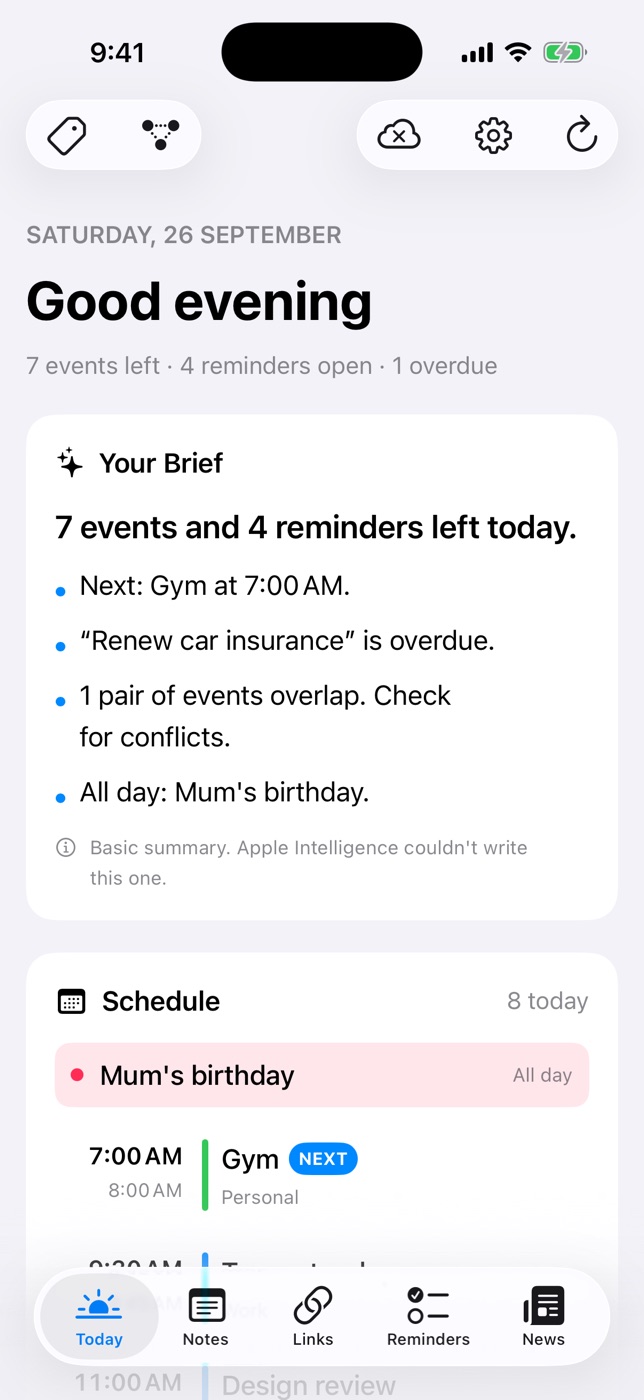
This is the job Daily Dash was built for. Its Today screen pulls your calendars, Apple Reminders and the app's own reminders into one place, then writes a short brief at the top: your next event, anything overdue, events that clash and all-day items. The brief is written on your device by Apple Intelligence, and when that isn't available you get a simple rule-based summary instead.
Below the brief you'll find the full schedule (with the next event marked), what's due today and overdue (tick things off right there), and a handful of headlines from feeds you chose. Read it, answer question three in your head, and close the app. Two minutes.
A morning routine checklist for work
Here's a checklist you can copy. It's split into a minimum version for rushed days and a full version for when you have time. The minimum version alone is enough to change how your day feels.
Minimum version (about 10 minutes)
- ☐ Turn off the alarm and put the phone face down. No apps yet.
- ☐ Drink a glass of water.
- ☐ Open light: curtains, a lamp, or step outside for a minute.
- ☐ The two-minute check-in: fixed events, due and overdue, the one thing.
- ☐ Write down the one thing somewhere you'll see it.
Full version (30–45 minutes)
- ☐ Everything in the minimum version.
- ☐ Move for 10–20 minutes: a walk, stretching, or a short workout.
- ☐ Eat something with protein so you're not snacking by 10.
- ☐ Brain dump: note anything on your mind so it stops circling.
- ☐ Skim headlines from a few feeds you trust, with a time limit.
- ☐ Prepare the first work block: open the document, close the rest.
Before you open your inbox
- ☐ You know when your first meeting is.
- ☐ You know what's overdue.
- ☐ You've picked the one thing and ideally blocked time for it.
If you can tick those three, email can wait twenty minutes. The first hour of focused work is often the most valuable of the day, and it's much easier to protect if you decided what it's for before anyone else could.
Set up your phone to help, not hijack
You don't need willpower if the phone makes the right thing the easy thing. A few changes go a long way:
- Put your plan on the first home screen, and move email off it. Whatever you tap by reflex should show your day, not your inbox.
- Use a Focus mode for the morning. iOS Focus can silence non-urgent notifications until a set time. Allow Time Sensitive notifications so real reminders still get through.
- Turn off badges on email and social apps. A red number is a tiny request. You don't need 40 of them before breakfast.
- Replace feeds with a short list of sources. If you like reading news in the morning, choose a few feeds and read them in one place with an end. Daily Dash's Today screen shows a few top headlines, and the News tab pages through stories one day at a time, so there's a natural stopping point. More on that in our RSS reader guide.
- Glance at your wrist instead. If you wear an Apple Watch, the Daily Dash watch app shows today's schedule, reminders, the brief and headlines, so you can do the check-in without picking up the phone at all.

Your two-minute check-in, ready when you wake up
Daily Dash puts your calendar, reminders and chosen headlines on one screen with a brief written on your device. No account, no ads, no tracking. See how Today works →
Making the routine stick
Routines fail when they're too ambitious or too vague. A few principles help:
Start smaller than feels useful
Begin with just the two-minute check-in for a week. Once it's automatic, add one more item. A routine you do every day beats a perfect one you do twice.
Anchor it to something you already do
“After I switch on the kettle, I open Today.” Attaching a new habit to an existing one removes the need to remember it. The kettle, the coffee machine and brushing your teeth all make good anchors.
Prepare the night before
A short evening shutdown makes the morning check-in faster: glance at tomorrow's calendar, add any reminders that are floating in your head, and pick a likely one thing. In the morning you're just confirming. If thoughts keep you up, capture them. Our guide to stopping forgetting things covers quick capture in detail.
Keep a bad-day version
Kids are sick, the train is cancelled, you overslept. On those days, do the minimum: water, check-in, one thing. The goal is to never skip the check-in entirely, because that's the piece that keeps your day yours.
Review once a week
Every Friday or Sunday, ask what worked and what you skipped. Drop items you never do; they're just guilt. A weekly review is the natural place for this.
FAQ
How long should a morning routine be?
Long enough to do the few things that matter and no longer. For most people that's 20 to 45 minutes in total, and the planning part can be as short as two minutes.
Should I check my phone first thing in the morning?
Checking your plan is fine. Checking feeds and email is what hijacks the morning. Open one screen that shows your day, read it, and put the phone down.
What if my mornings are unpredictable?
Use the minimum version: water, a two-minute look at the day, and choosing one priority. Do the full version on the days that allow it.
Is it better to plan the night before or in the morning?
Both, briefly. A short shutdown the evening before sets up tomorrow, and the morning check-in confirms nothing changed overnight.