Blog › Routines
How to get a daily briefing on your iPhone
Presidents get a daily brief. So do news anchors and CEOs. The idea is simple: before the day starts, someone boils it down to the few things that matter. Your iPhone already knows your meetings, your to-dos and the headlines. Here's how to make it hand you that summary each morning, from free built-in tricks to a brief that writes itself.
Why a brief beats checking five apps
The typical morning check goes like this: Calendar, then Reminders, then Mail “just to see”, then a news app, then something with an infinite feed. Twenty minutes later you know a lot about other people's days and still aren't sure when your first meeting is.
The problem isn't the information. It's that it's spread across apps, each designed to keep you inside it. A brief flips that around. Instead of you visiting every source, the sources come to one place and get cut down to what's actionable. You read it, you know the shape of the day, and you close the phone.
A good brief also catches things you'd miss scanning a calendar grid: two events that overlap, a reminder that went overdue yesterday, an all-day item like a birthday that doesn't show up as a block of time.
What a good brief contains
Whatever tool you use, aim for a summary you can read in under a minute. That usually means:
- What's next. The first event and when you need to leave or log in.
- What's overdue. Anything that slipped, so it gets a new date or gets dropped.
- What clashes. Overlapping events you need to resolve before they happen, not during.
- What's all day. Birthdays, deadlines, travel days, someone being out of office.
- A few headlines. Three to five, from sources you chose. Not a feed.
Notice what's missing: email, social media and anything that doesn't end. Those can wait until you've decided what your day is for.
Built-in options on iPhone
iOS doesn't have a single “daily brief” screen, but you can assemble one from pieces Apple already ships.
1. Scheduled Summary
In Settings › Notifications › Scheduled Summary, pick the apps whose notifications can wait and choose a time, like 7:30 AM. Instead of trickling in overnight, they arrive as one bundle. It's the easiest win on this list: fewer buzzes, and one moment where you catch up.
2. Apple Intelligence notification summaries
On devices that support Apple Intelligence, you can turn on summaries for notifications. A long group chat or a stack of emails collapses into a line or two on the Lock Screen. It's great for triage, but it summarizes what arrived, not what's planned. It won't tell you your 10 AM clashes with your 10:30.
3. A Shortcuts morning digest
The Shortcuts app can build a routine that runs each morning: get today's calendar events, get reminders due today, maybe the weather, then show or speak the result. Set it up as a Personal Automation that runs at a set time or when you turn off your alarm. On recent iOS versions, Apple Intelligence can help you build or phrase it too.
It works, and it's free. The trade-off is maintenance: shortcuts tend to break when you rename a list or add a calendar, and the output is a plain list rather than a summary that points out what matters.
4. Siri
“Hey Siri, what's on my calendar today?” gets you the events. Ask again for reminders. It's handy while you're making coffee, but it's two questions, and it won't catch conflicts or overdue items for you.
A brief that writes itself
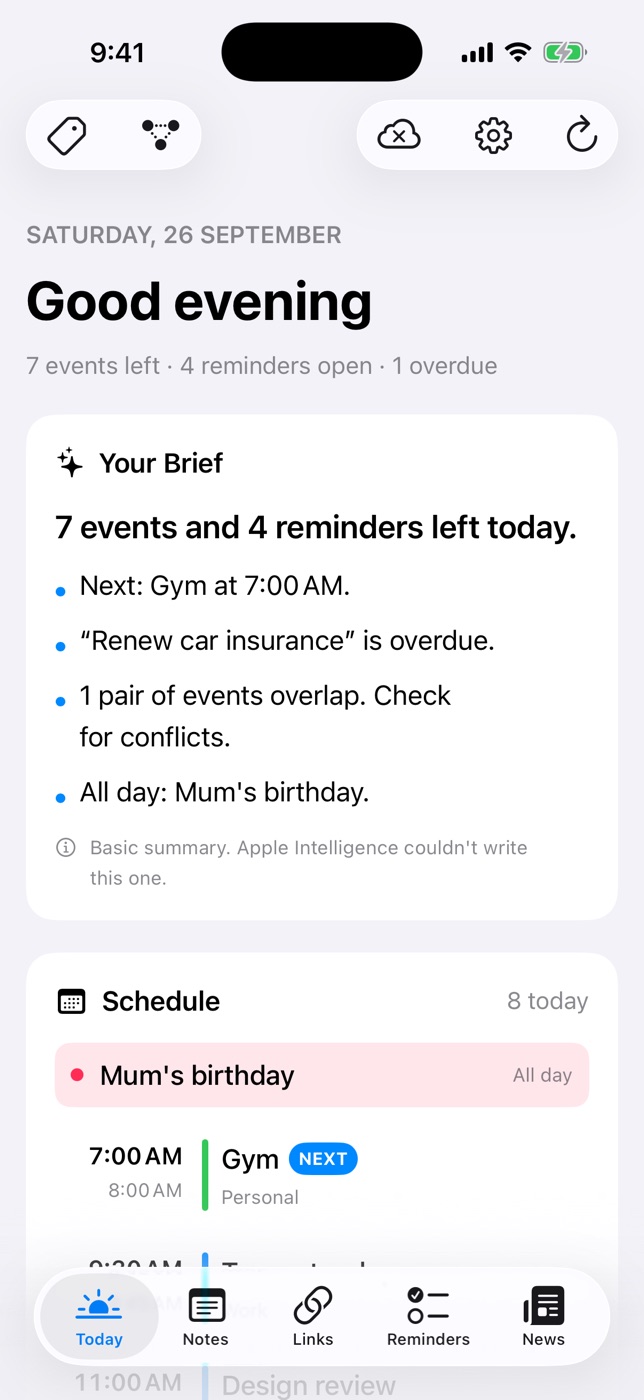
If you'd rather not build and maintain a shortcut, Daily Dash makes the brief the first thing you see. Open the app and the Today screen starts with Your Brief: a few lines about the day, written from your calendars, Apple Reminders and Daily Dash's own reminders. It mentions:
- your next event,
- anything overdue,
- events that overlap,
- and all-day items.
The brief is written by Apple Intelligence on your device. Your calendar doesn't leave your phone to be summarized, and there's no account or server involved. On devices without Apple Intelligence, or while the model is still downloading, you get a rule-based summary instead, with a small note saying so. Either way, you get a brief.
Below it, the rest of Today fills in the detail:
- Schedule lists every event, marks the next one and flags overlaps.
- Reminders shows what's due and overdue, from both Apple Reminders and Daily Dash, and you can tick things off right there.
- News shows the top headlines from feeds you follow. Once you've read for a while, it picks the ones you're likely to open. You can filter the card by a tag, say, only #work feeds.
To keep the brief focused, turn off Include in Brief on any feed that you like to browse but don't need first thing. It'll stay in the News tab and out of your morning.

Your day, in three lines
Daily Dash puts your calendar, reminders, notes, links and news on one screen, then writes you a short brief on your device. No account, no ads, no tracking. See how Today works →
On your wrist, too
The Daily Dash watch app shows the brief and headlines from your iPhone, along with today's schedule and reminders. If you'd rather not pick up your phone at all first thing, a glance at your watch covers it. More on that in our Apple Watch productivity guide.
Making the brief a habit
A brief only helps if you read it before the day starts reading you. A few ways to lock that in:
- Put it where your thumb goes. Move your brief app to the spot on the Home Screen where your most-scrolled app currently lives. Muscle memory does the rest.
- Read it at a fixed moment. With the first coffee, on the train, before you open your laptop. Tie it to something you already do.
- Act on it immediately. If the brief shows an overlap, decline one meeting now. If something's overdue, give it a new date or delete it. The brief is a to-do list for your list.
- Stop when it's done. The point is that it ends. Close the app and start the day. Our morning routine guide builds a whole two-minute routine around this.
- Review weekly. Once a week, look ahead further than today. A weekly review is the natural partner to a daily brief.
FAQ
Does the iPhone have a built-in daily briefing?
Not as one screen. You can get close with Scheduled Summary, a Shortcuts automation and Apple Intelligence notification summaries.
Does a daily brief need Apple Intelligence?
Not in Daily Dash. On supported devices, Apple Intelligence writes it. Otherwise, a rule-based summary covers the same ground: next event, overdue items, overlaps and all-day events.
Is my calendar sent anywhere?
No. Daily Dash writes the brief on your device, and calendars and Apple Reminders are read through the system without being copied off it. See the privacy policy.
Can I keep some news feeds out of the brief?
Yes. Turn off Include in Brief for that feed in Manage Feeds.