Blog › News
How to stop doomscrolling (without quitting the news)
You pick up your phone to check one thing. Forty minutes later you've read about three disasters, two arguments and a celebrity you'd never heard of, and you feel worse than when you started. The answer isn't to stop caring what happens in the world. It's to change the shape of how the news reaches you, so it has a beginning and an end.
Why feeds are so hard to put down
Social and news feeds are built around one idea: there's always more. No bottom, no “you're done”, just the next card. Every refresh might contain something important, so stopping always feels slightly risky. Add headlines written to provoke, comments underneath that provoke more, and a phone that's always within reach, and the scrolling isn't a character flaw. It's the design working as intended.
That's good news, because it means the fix is mostly about design too. You don't need more willpower. You need a news diet that runs out.
Rule 1: make the news finite
Compare a newspaper with a feed. The newspaper has a last page. When you reach it, you know what happened yesterday and you put it down. A feed never tells you that.
You can recreate the last page on your phone:
- Read by day, not by stream. “Yesterday's stories from my sources” is a list you can finish. “Latest” never is.
- Prefer lists over infinite scroll. A digest, a newsletter, or a reader that shows a fixed set of items.
- Mark things read. Seeing stories dim as you go is a small, satisfying signal that you're making progress toward the end.
- Clear the backlog. Unread counts that climb into the hundreds create guilt, and guilt keeps you scrolling. Declaring bankruptcy on old news is healthy.
Rule 2: choose sources on purpose
Algorithmic feeds decide what you see based on what keeps you there, which is rarely what informs you best. Take that decision back.
- Write down what you actually want to know about. Your city, your industry, a sport, a couple of big stories. Five to ten topics is plenty.
- Pick one or two sources per topic. A good local paper, a trade publication, a writer you trust. Most sites still publish an RSS feed, even if they don't advertise it.
- Use topic searches for the rest. Following a topic like “interest rates” or “Formula 1” gives you coverage across outlets without adding ten more subscriptions.
- Prune monthly. If you skip a source every day, unfollow it. If one always leaves you angry and no wiser, unfollow it faster.
An RSS reader is the classic tool for this, and it's having a quiet comeback for exactly this reason: you follow sites, not an algorithm. We cover the basics in our guide to RSS on iPhone.
Rule 3: one check-in, at a set time
Very little news changes what you'll do in the next hour. So give it a slot. For most people, one of these works:
- With morning coffee, after you've looked at your own day. This is the slot we like best, because your plans come first and the world second.
- At lunch, when a ten-minute read is a break rather than a derailment.
- Early evening, well before bed. News at midnight is a reliable way to sleep badly.
Outside that slot, if you catch yourself reaching for news, ask: “Is there something I'd do differently if I knew right now?” Almost always, no. It'll be there at the check-in.
Rule 4: read fewer stories, more deeply
Twenty headlines leave you with twenty fragments and a vague sense of dread. Three articles read properly leave you actually understanding something. Some habits that help:
- Skim headlines, then choose. Pick two or three stories worth your attention and read them to the end.
- Read without the noise. A reader view with no ads, no autoplay video and no comments makes an article feel like reading, not browsing.
- Save, don't open. If a long piece looks good but it's not the time, save it for later instead of opening another tab. See our take on read-later apps after Pocket.
- Skip the comments. They're where calm reading goes to die.
A calmer news setup in Daily Dash
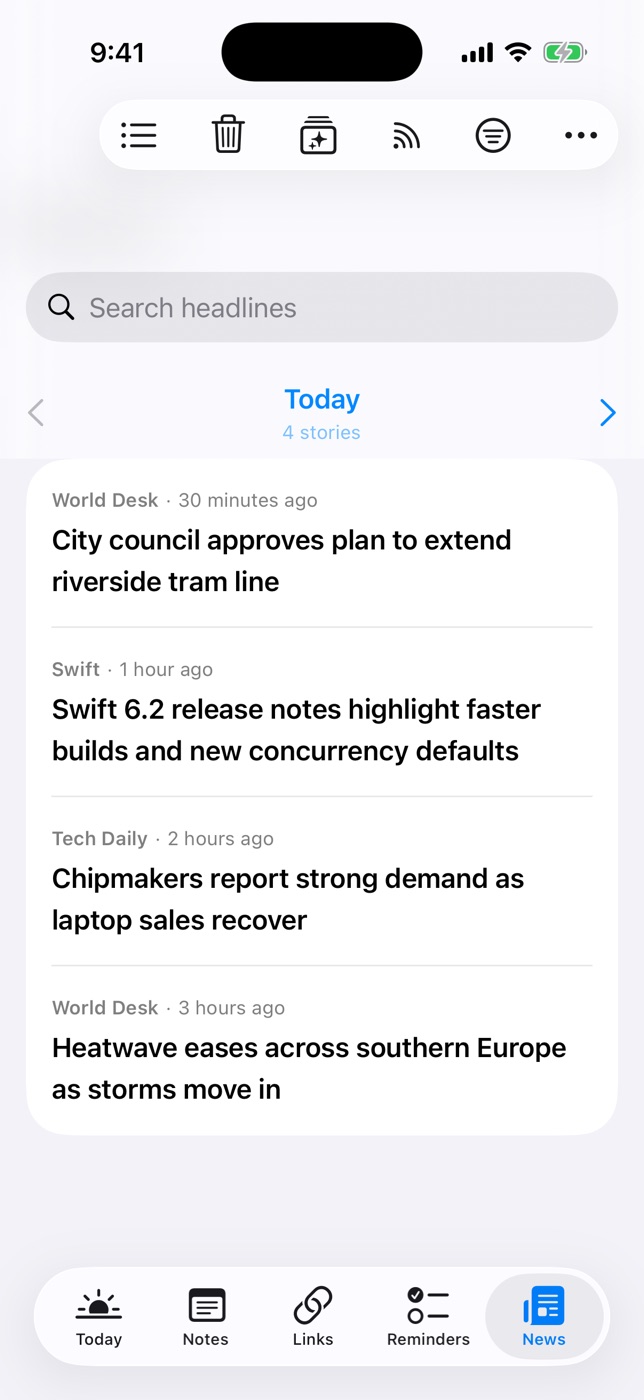
We built the News tab in Daily Dash around these rules. It's a feed reader, but one that's finite on purpose.
Follow sources, not an algorithm
Open Manage Feeds and paste any website address. Daily Dash finds its RSS, Atom or JSON feed for you. For broader coverage, add a Google News topic such as “climate policy” or your city's name, in your language and region.
Read one day at a time
The News tab pages through stories a day at a time, with arrows to move between days. Yesterday has an end. Read stories dim, so you can see how much is left.
Headlines in their place
The Today screen shows your calendar, reminders and brief first, then a small News card with the top headlines. Filter that card by a tag, say #work or #local, so your morning glance shows only what's relevant. Feeds you want to follow but not see every morning can have Include in Brief turned off, and a noisy feed can be switched to Paused for a while without unfollowing.
A quiet reader, even offline
Stories open in a clean reader that works offline. New stories are saved in the background, so a train with no signal is a fine time to read. Offline copies are dropped after seven days, while the headlines stay. Anything worth keeping, Save to Links.
Clear the backlog in one go
Clear Old News… removes every story published before a date you choose. Back from a week away? Clear it, start fresh, and trust that anything important will come round again.
Less noise over time
Daily Dash notices which stories you open, read through and keep, and trains a small model on your device. Once it has enough history, it picks Today's headlines, filters new-story notifications, and powers the For You sort, with a reason shown for each story. It all runs on your iPhone; there's no server of ours learning what you read.

News that ends
Daily Dash puts your feeds next to your calendar and reminders, one day at a time, with no account, no ads and no tracking. See how News works →
iPhone settings that help
A calmer app helps, but the phone itself can do a lot of the work:
- Set App Limits in Screen Time. Settings › Screen Time › App Limits. Give social apps a daily budget. When it runs out, you get a screen asking if you really want more.
- Turn off breaking news notifications. Settings › Notifications, app by app. Almost no “breaking” alert needs to reach you within the minute.
- Use a Focus for evenings. A Sleep or Personal Focus can hide news and social apps from your Home Screen and silence their notifications after a set time.
- Move feeds off your first Home Screen. If the app isn't the first thing your thumb lands on, you open it less. Put your calendar and task apps there instead.
- Try Grayscale for a week. Settings › Accessibility › Display & Text Size › Color Filters. A grey screen is surprisingly less compelling.
- Charge your phone outside the bedroom. The single most effective change for late-night scrolling, and it costs nothing.
A simple plan for this week
- List your topics and pick two sources each.
- Follow them in one reader, and unfollow the rest.
- Choose one daily check-in time.
- Turn off news notifications and set an App Limit for your worst feed.
- At the end of the week, notice how much you actually missed. Usually: nothing that mattered.
FAQ
What is doomscrolling?
Scrolling through bad news long past the point where it informs you, usually on a feed that never ends. It feels like staying informed but mostly leaves you anxious and tired.
Do I have to quit the news?
No. Read a chosen set of sources, at a set time, in a view that runs out. You'll stay just as informed in far less time.
How often should I check the news?
Once or twice a day is plenty for most people. Pick a fixed time and let the rest wait.
What's the best way to read news on iPhone without social media?
An RSS reader or a news app that shows only the sources you follow, with no comments and no endless recommendations. Daily Dash follows RSS, Atom and JSON feeds and Google News topics, and pages through stories one day at a time. Only https feeds are supported.