 Daily Dash
Blog › News
Google News RSS feed: how to get a feed for any topic
Most RSS feeds follow a website. Sometimes you want to follow a subject instead: a company, a court case, your town, a sport. Google News still offers RSS feeds for any search, and they work in any feed reader. Here's the exact URL format, the search operators that make it precise, how to set language and region, and a shortcut if you'd rather not build URLs by hand.
The URL format
A Google News search feed looks like this. We tested every URL on this page on September 28, 2026:
https://news.google.com/rss/search?q=electric+bikes&hl=en-GB&gl=GB&ceid=GB:enFour parts matter:
/rss/searchturns a Google News search into RSS. Swap it for the normal/searchand you get the web page of the same results.q=is your search, URL-encoded. Spaces become+or%20, and double quotes become%22.hl,glandceidset the language and country edition. More on those below.
For the general top stories of an edition, drop the search part:
https://news.google.com/rss?hl=en-GB&gl=GB&ceid=GB:enNo API key or account is needed. Paste either URL into a feed reader and it behaves like any other feed. A search feed returns about 100 stories, with recent coverage mixed in with older matches.
Language and region: hl, gl and ceid
These three parameters pick which edition of Google News you're searching. Keep them consistent with each other.
| Edition | hl | gl | ceid |
|---|---|---|---|
| United Kingdom, English | en-GB | GB | GB:en |
| United States, English | en-US | US | US:en |
| India, English | en-IN | IN | IN:en |
| Germany, German | de | DE | DE:de |
| France, French | fr | FR | FR:fr |
The pattern: gl is the two-letter country code, ceid is COUNTRY:language, and hl is the language. English editions use a regional hl like en-GB; most other languages use the bare code, like de.
Why it matters: the same search in the UK and US editions returns different outlets and different angles. “Interest rates” in the UK edition is mostly about the Bank of England; in the US edition, the Federal Reserve.
Search operators that work
The q parameter accepts the same operators as a Google News search. These are the useful ones:
| Operator | Example | What it does |
|---|---|---|
| Quotes | "electric bikes" | Exact phrase only |
| OR | "interest rates" OR inflation | Either term. Write OR in capitals |
| Minus | jaguar -car | Exclude a word |
| site: | climate site:bbc.co.uk | One publisher only |
| intitle: | intitle:heatwave | Word must be in the headline |
| when: | "Formula 1" when:1d | Only the last day (try 7d, 12h) |
Encoded, the OR example becomes:
https://news.google.com/rss/search?q=%22interest+rates%22+OR+inflation&hl=en-GB&gl=GB&ceid=GB:en"Apple" iPhone) or a minus usually fixes a noisy feed faster than adding more terms.Ready-to-use examples
Replace the query and keep your edition's hl, gl and ceid:
- Your employer and a competitor:
q=%22Acme+Corp%22+OR+%22Globex%22 - Your town, local papers only:
q=%22Bristol%22+site:bristolpost.co.uk - A court case or bill by its name:
q=%22Online+Safety+Act%22 - A team, without the betting tips:
q=%22Arsenal%22+-odds+-betting - Breaking news only: add
+when:1dto any query
Swap in your own names and sites. Open the feed in a browser first; if it's empty or noisy, adjust the query and try again.
Things to know
- Links are redirects. Each story's link points to
news.google.com, not the publisher. Browsers follow it. Some readers can't, which breaks offline saving. - Titles include the source. Headlines end with “ - Publisher”. Good readers show the publisher separately.
- Summaries are thin. The description mostly repeats the headline with a link. You'll need to open the story to read it.
- Personal use. The feed states it's provided for personal, non-commercial use in a feed reader. Following topics for yourself is exactly that.
- Keep it to a few. Each topic feed can bring in dozens of stories a day. Three to five topics is plenty alongside your regular feeds.
New to RSS in general? Start with our RSS reader on iPhone guide, which covers finding any site's feed and curating a list you can keep up with.
Skip the URL: Add Topic in Daily Dash
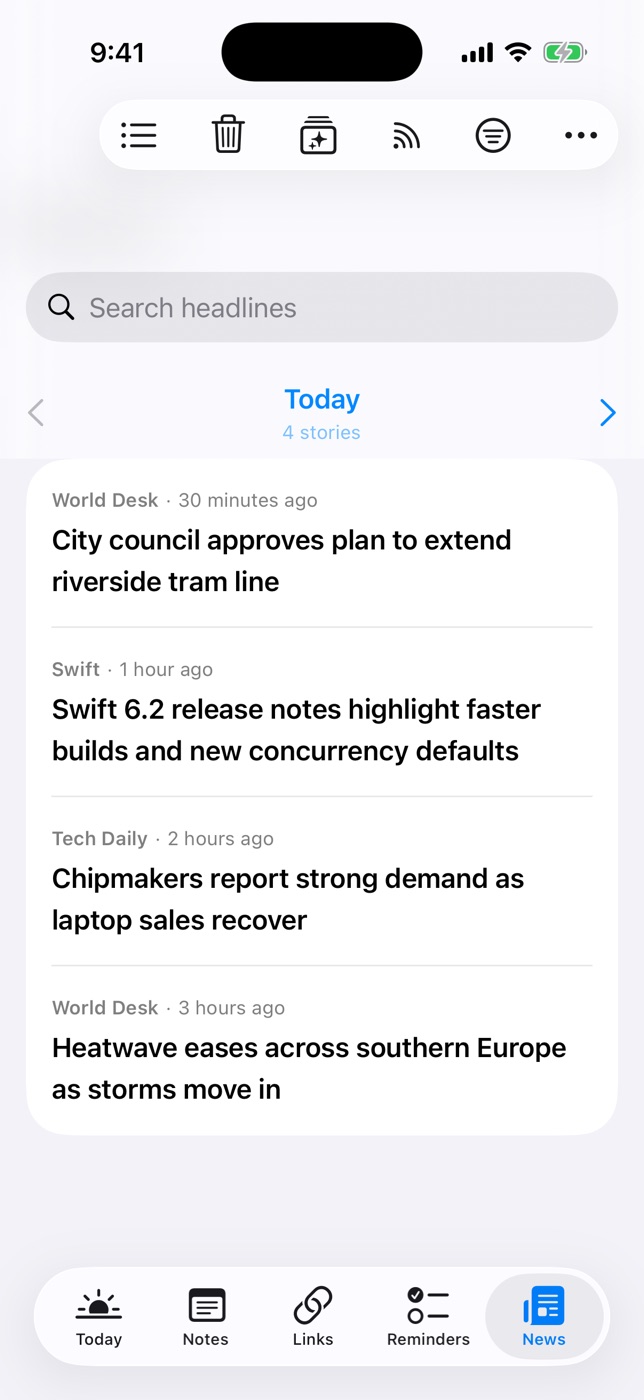
Building URLs is fine once. For everyday use, Daily Dash does it for you. In News, open Manage Feeds and choose Add Topic…. Type the subject, like Formula 1 or "interest rates" OR inflation, and Daily Dash builds the Google News search feed using your device's language and region. Quotes and OR work the same way as above.
From there a topic behaves like any feed (see the News guide):
- Redirects are handled. Daily Dash follows Google News links to the publisher, so stories open in a clean reader and are saved for offline reading. Offline copies are dropped after 7 days; the headlines stay.
- Duplicates collapse. The same story from several feeds shows once.
- Tag it. Tag a topic #work and filter the Today news card to work feeds only.
- Keep it out of the morning. Turn off Include in Brief for a busy topic, or pause it for a while.
- Private by design. No account. Your subscriptions sync through your own iCloud, and story picks for you are learned on your device.
Built your own URL with site: or when:? Paste it in Manage Feeds like any feed address. Google News feeds are https, which is all Daily Dash needs.
A busy topic can bring a lot of headlines. If that starts to feel like a feed you can't stop scrolling, our guide to stopping doomscrolling has a few habits that help.

Follow any topic in one tap
Daily Dash is coming soon to the App Store for iPhone, iPad, Mac and Apple Watch. RSS and Google News topics, read offline, no account. See how News works →
FAQ
Does Google News still have RSS feeds?
Yes. As of September 2026 the /rss/search?q=… format returns a feed of matching stories, and /rss returns top stories. No key or account needed.
How do I get a feed for an exact phrase?
Wrap it in double quotes, encoded as %22: q=%22electric+bikes%22.
What do hl, gl and ceid mean?
Language, country, and the two combined as COUNTRY:language. Keep them consistent.
Why do links go to news.google.com?
Google wraps each story in a redirect. Browsers follow it, and Daily Dash follows it to the publisher so stories can be read offline.
Can I use Google News RSS commercially?
The feed says it's for personal, non-commercial use in a feed reader.