Blog › News
RSS on iPhone in 2026: how to follow the web without the algorithm
Social feeds decide what you see. RSS lets you decide. It's the quiet, decades-old technology that still powers podcasts, blogs and most news sites, and it's the best way to follow exactly the sources you trust, in order, without ads or outrage bait. Here's how it works, how to find feeds, how to turn Google News topics into feeds, and how to read it all on your iPhone, even offline.
What RSS is, in one minute
An RSS feed is a small file a website publishes alongside its pages. It lists the site's latest posts: title, link, date and usually a summary or the full text. An RSS reader checks the feeds you've subscribed to and shows you anything new.
That's it. No account with the website, no algorithm in the middle, no tracking of what you tap. You see every post from every source you chose, and nothing else.
You'll also see Atom and JSON Feed. They're different formats for the same idea, and any decent reader handles all three. You don't need to care which one a site uses.
Is RSS still used?
Very much. It's just invisible. Every podcast you've ever listened to was delivered by RSS. WordPress, Ghost, Substack and most blogging platforms publish feeds automatically. Most major news outlets have them, often one per section. YouTube channels have them. Many newsletters offer a feed so you can read them outside your inbox.
What faded was the reading of RSS, when social media took over as the way people found things. But as timelines have become noisier and more algorithmic, a lot of people have come back to RSS for the same reason they left email newsletters for it: control.
How to find any site's feed
Try these in order:
- Paste the home page into your reader. Most modern readers, including Daily Dash, look inside the page for a feed link and find it for you. This works most of the time.
- Look for the icon. An orange square with radio waves, often in the footer, or a link labelled RSS, Feed or Subscribe.
- Guess the address. Common ones are
/feed,/rss,/rss.xml,/atom.xmland/index.xml. WordPress sites almost always answer at/feed. - Check the section. Big news sites often have separate feeds for Technology, Sport, Business and so on. Following a section rather than the whole site is a great way to cut noise.
https feeds. If a feed won't add, paste the site's home page instead so it can discover the right, secure address.Google News topics as feeds
Some things you want to follow aren't a website; they're a subject. “Formula 1.” “Interest rates.” “Your town's name.” For those, Google News is useful: it aggregates coverage from many outlets, and it offers feeds for search topics.
Doing this by hand means building a feed URL with the right query, language and region parameters. In Daily Dash you skip that: choose Google News topic when adding a feed, type the subject, and pick your language and region. The topic then behaves like any other feed.
A few ideas that work well as topic feeds:
- Your company and its main competitors
- Your city or neighbourhood
- A team, a league or a sport
- A technology you work with
- An ongoing story you want to follow without watching the whole news cycle
Curate a feed list you can keep up with
The classic RSS mistake is subscribing to everything and drowning in 900 unread items by Wednesday. A few rules keep it pleasant:
Start with ten
Pick ten sources you'd genuinely miss. Add more only when you find yourself visiting a site by hand more than once a week.
Prefer low-volume, high-signal sources
A personal blog that posts twice a month is often worth more than an outlet that posts 200 times a day. For high-volume sites, subscribe to one section instead of the front page.
Group by tag, not by folder
Tags like work, local, hobby let you filter your reading by mood and time. At work, read the work tag. On Saturday, read the hobby tag.
Pause instead of unsubscribing
Feeds have seasons: a sports site during the off-season, a conference blog outside conference week. Pause them rather than deleting and re-finding them later.
Let old news go
Unread count is not a to-do list. If you've been away for a week, mark it all as done and start fresh. Anything truly important will come up again.
If you've been using feeds to replace endless scrolling, our guide to staying informed without doomscrolling goes deeper on this.
Reading RSS in Daily Dash
There are excellent dedicated RSS apps for iPhone: NetNewsWire is free and open source, Reeder has a loyal following, and services like Feedly and Inoreader add web-based syncing and power-user filters. If you want RSS as its own world, any of them is a fine choice.
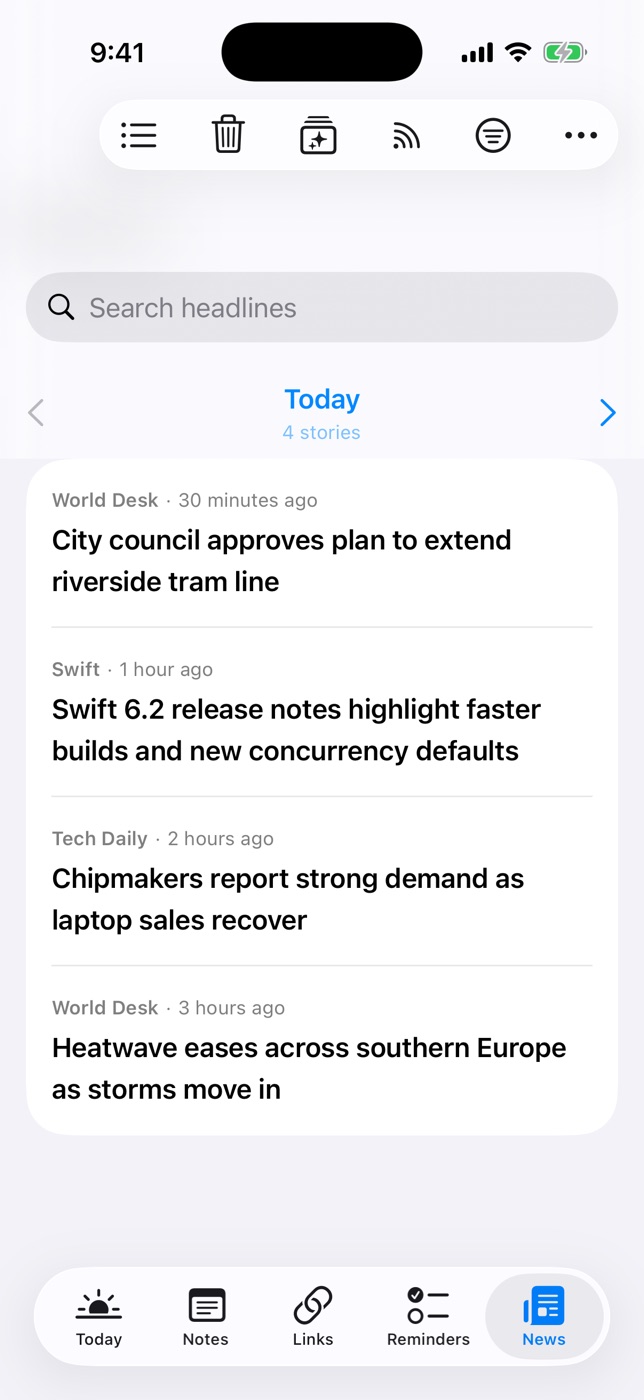
Daily Dash takes a different angle: your feeds sit next to your calendar, reminders, notes and saved links, and the day's top headlines appear on your Today screen alongside your schedule. It's built for reading the news in a few calm minutes, not for processing 900 items.
Adding feeds
- In the News tab, open Manage Feeds.
- Paste a website address and Daily Dash finds its RSS, Atom or JSON feed, or paste the feed URL directly.
- Or add a Google News topic by name, in your language and region.
- Tag each feed. Turn off Include in Brief for feeds that shouldn't reach Today, or set a feed to Paused for a while.
Reading
- One day at a time. The News tab pages through stories by day, so you always know where you are and when you're done.
- Offline reader. New stories are saved in the background, including Google News links, which are followed through to the publisher. The reader works on a plane. Offline copies are dropped after 7 days; headlines stay.
- Clear Old News. Remove everything published before a date you choose, in one step.
- Keep what matters. Save any story to Links from the reader and it's kept for good, with room for a note and tags.
- Filter Today by tag. Narrow the Today news card to, say, only your work feeds.
For You, on your device
Once you've read for a while, Daily Dash learns which stories you open, read through and keep, using a small model trained on your device. It then picks Today's headlines and powers a For You sort, with a short reason shown for each story. None of that reading history leaves your phone. It's the one kind of algorithm worth having: one that works for you and answers to you.
Your subscriptions sync through your own iCloud, and articles are fetched and cached on each device, with background refresh on iPhone and iPad. There's no account and no Daily Dash server in between.

Your feeds, next to your day
Follow RSS, Atom, JSON feeds and Google News topics in Daily Dash, read offline, and see the top headlines beside your calendar. See how News works →
FAQ
Is RSS still used in 2026?
Yes. Most blogs, news sites, podcasts and YouTube channels publish feeds, and podcasts run entirely on RSS.
How do I find a website's RSS feed?
Paste the home page into a reader that discovers feeds, look for the RSS icon, or try /feed or /rss.xml after the domain.
Can I get Google News as an RSS feed?
Yes. Google News offers feeds for topics. In Daily Dash, add a Google News topic by name and pick your language and region.
Why won't a feed add in Daily Dash?
Daily Dash only supports https feeds. Paste the site's home page instead so it can find the secure address.
Do I need an account to use RSS?
Not with Daily Dash or with local-only readers like NetNewsWire. Sync services such as Feedly and Inoreader use an account to sync across devices; Daily Dash syncs your subscriptions through your own iCloud.