 Daily Dash
Home › Alternatives › Feedly
A Feedly alternative for iPhone
Feedly helped keep RSS alive after Google Reader closed, and it still runs a consumer reader. But its focus has shifted towards businesses, and some people just want a personal feed reader on their iPhone with no account. That's the gap Daily Dash fills. Here's an honest comparison.
Where Feedly is today
As of September 2026, Feedly's homepage leads with Feedly Threat Intelligence, a product for cyber security teams. The consumer news reader is still there, linked from the site, with a free plan and paid Pro tiers that add more sources and AI features. It runs on the web, iOS and Android, with browser extensions, and you sign up for a Feedly account to use it.
None of that makes Feedly a bad reader. It does mean the product is designed for people who follow a lot of sources, often for work.
What people like about Feedly
- Everything in one place. News sites, blogs, newsletters, Reddit and Google News feeds side by side.
- Boards and notes for saving and annotating articles.
- Search across your sources.
- Every platform, with sync through your Feedly account.
- AI help on paid plans for prioritising and filtering articles.
What Daily Dash offers
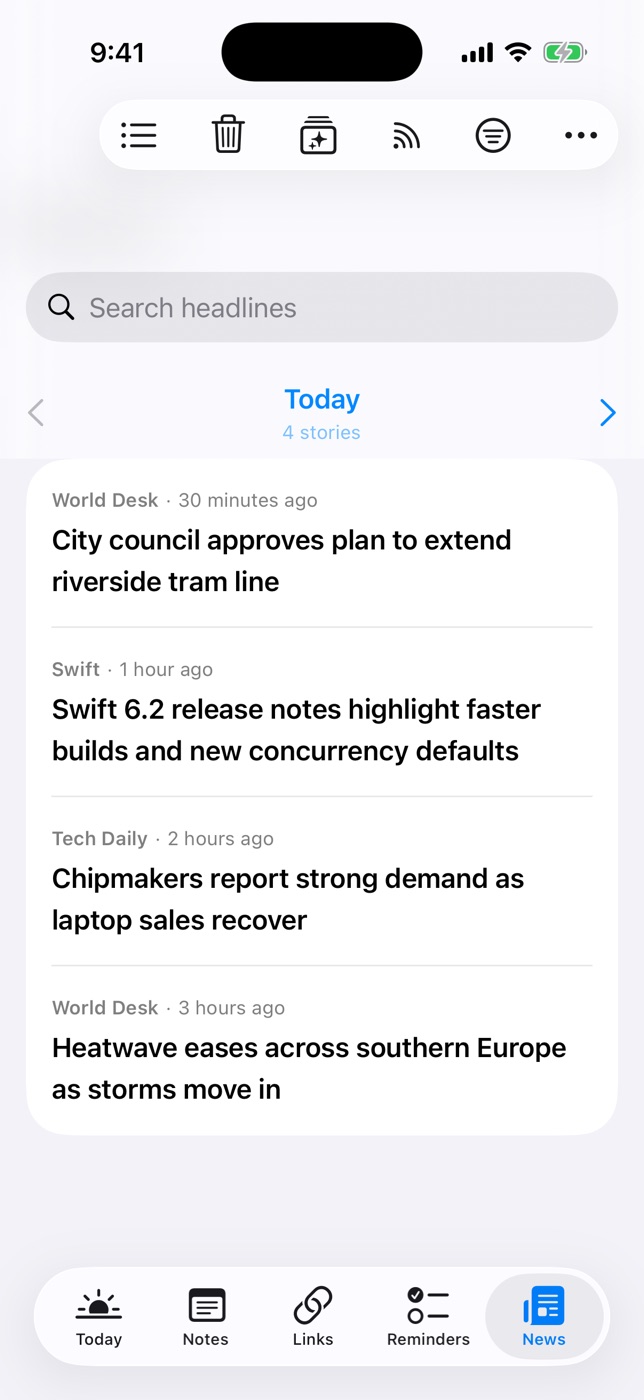
Daily Dash is a daily dashboard for iPhone, iPad, Mac and Apple Watch. Its News tab is a deliberately simple personal reader:
- Add by website. Paste a site's address and Daily Dash finds its RSS, Atom or JSON feed. Only https feeds are supported. Or pick from suggested feeds like BBC, NPR, The Guardian, The Verge, Ars Technica and Hacker News.
- Google News topics in your language and region, with quotes for exact phrases and OR for either term.
- No account. Subscriptions sync through your iCloud. Articles are fetched and cached on each device, with background refresh on iPhone and iPad.
- Offline reader. New stories are saved in the background. Offline copies are dropped after 7 days while the headlines stay.
- On-device For You. A small model on your device learns from what you open, read through and keep, and shows a reason for each pick.
- Tags and filters. Tag feeds, filter by feed or tag, search headlines. Duplicate stories from several feeds show once.
- Calm by design. News pages a day at a time, Clear Old News… tidies up, and new-story notifications replace each other instead of piling up.
- Keep what matters. Save a story to Links for good, with a note and tags.
What it doesn't have: OPML import, Reddit or newsletter-by-email sources, http-only feeds, team features, a web app or Android.
Side by side
Feedly details as of September 2026, from Feedly's website. Plans and prices change, so check Feedly's pricing page for current limits.
| Feedly news reader | Daily Dash | |
|---|---|---|
| Account | Feedly account | None; syncs via your iCloud |
| Price | Free plan, paid Pro tiers | Coming soon to the App Store |
| Platforms | Web, iOS, Android, extensions | iPhone, iPad, Mac, Apple Watch |
| RSS and Google News | Yes | Yes (https feeds) |
| Newsletters, Reddit | Yes | Only if they publish an https feed |
| AI features | On paid plans | On-device For You ranking |
| Offline reading | — | Yes, 7-day offline copies |
| Saving articles | Boards | Links, with notes and tags |
| OPML import | — | No |
| Next to calendar and reminders | — | Yes, on Today |
Who should pick what
Stay with Feedly if you follow hundreds of sources, research for work, share with a team, or need Android, Windows or a web app.
Pick Daily Dash if you follow a few dozen sites and topics for yourself, read mostly on iPhone, want no account, and like seeing headlines next to your calendar each morning. It's a reader that fits into your day more than a research tool.
How to switch
- Export your sources. Feedly lets you export your subscriptions as an OPML file. Open it in a text editor to see the list of sites.
- Pick the ones you read. Be strict. If you haven't opened a source in a month, leave it out.
- Add them in Manage Feeds. Paste each site's home page. Daily Dash finds the feed and shows its story count and last update.
- Recreate folders as tags. Your Feedly folders map well to tags like #tech or #work, which you can use to filter News and the Today card.
- Move saved articles. For boards you still use, paste the important links into Links.

A personal feed reader with no account
Daily Dash follows your feeds and Google News topics, reads offline, ranks on your device and syncs through your own iCloud. Coming soon to the App Store for iPhone, iPad, Mac and Apple Watch. See how News works →
FAQ
Is Feedly still available for personal use?
Yes. As of September 2026, Feedly's homepage leads with its threat intelligence product for security teams, but the consumer news reader is still available with a free plan and paid tiers, on the web, iOS and Android.
Can I import my Feedly OPML file into Daily Dash?
No. Daily Dash has no import tool. Open the OPML file, pick the sources you still read and paste each site's address into Manage Feeds. Daily Dash finds the feed for you.
Does Daily Dash need an account?
No. Feed subscriptions sync through your private iCloud, and articles are fetched and cached on each device. There's no Daily Dash account or server.
Can Daily Dash read Google News feeds?
Yes. Add a Google News topic, like “Formula 1” or “interest rates”, in your language and region. Use quotes for an exact phrase and OR to match either term.
Does Daily Dash work on Android or the web?
No. Daily Dash runs on iPhone, iPad, Mac and Apple Watch.