 Daily Dash
Home › Alternatives › Apple News
An Apple News alternative with your own feeds
Apple News is already on your iPhone, and for a lot of people it's good enough. But if you want to follow a niche blog, a local paper Apple doesn't carry, or a topic in a country where Apple News isn't offered, you need something else. Here's a fair comparison with Daily Dash, and who should use which.
What Apple News does well
As of September 2026, according to Apple:
- It's free and built in, with top stories chosen by human editors and a free daily briefing, Apple News Today.
- Personalisation stays private. Apple says it uses on-device intelligence to recommend stories and doesn't share your reading data with advertisers.
- Apple News+ ($12.99 a month in the US) adds hundreds of magazines and newspapers, narrated audio stories, puzzles, offline reading and Family Sharing.
If you read mostly major publications and live in a supported country, that's a strong package.
Why people look for an alternative
- Availability. Apple News is offered in the US, UK, Canada and Australia only.
- Sources. You read what's in Apple's catalogue. The small blog, the club newsletter's feed or a trade site may not be there.
- Ads. The free app carries advertising.
- Offline reading is part of Apple News+, the paid tier.
- An endless feed. Some people want a news list that ends. See how to stop doomscrolling.
What Daily Dash offers
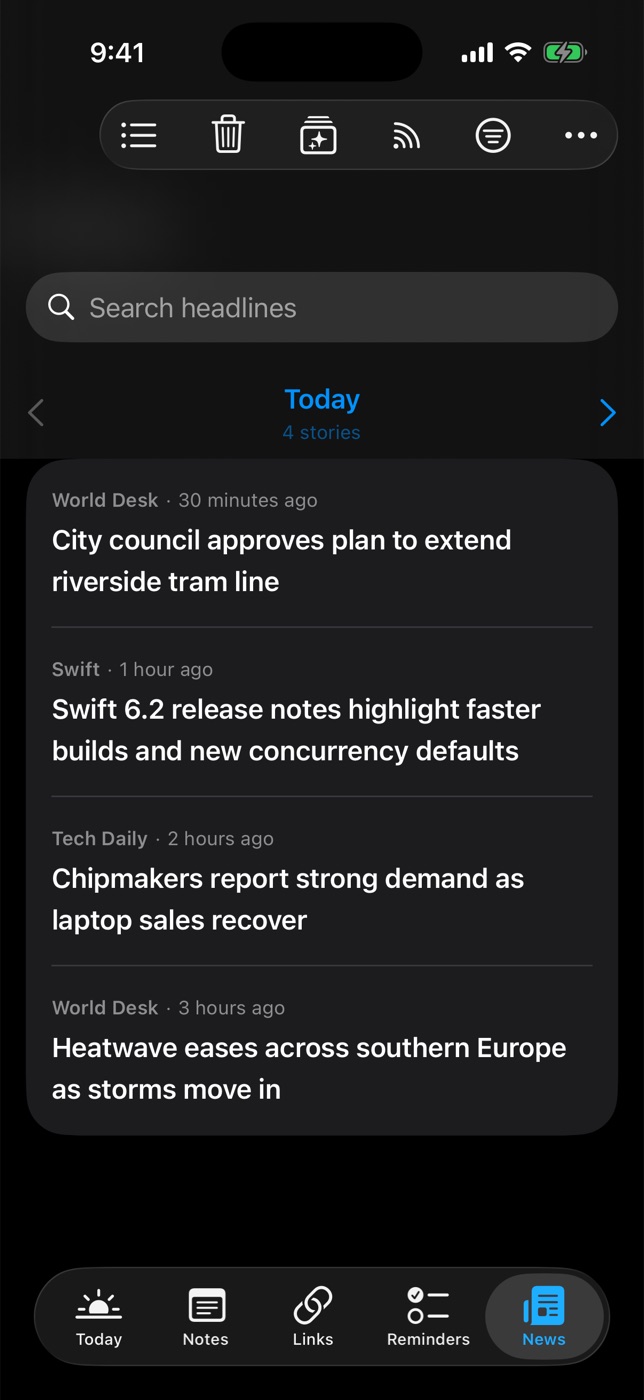
Daily Dash is a daily dashboard for iPhone, iPad, Mac and Apple Watch. Its News tab is built around sources you choose:
- Any site with a feed. Paste a website address and Daily Dash finds its RSS, Atom or JSON feed. Only https feeds are supported.
- Google News topics in your language and region, like “Formula 1” or “interest rates”. Quotes match an exact phrase, OR matches either term.
- Offline reading included. New stories are saved in the background. Offline copies are dropped after 7 days, and the headlines stay. Google News links are followed through to the publisher.
- On-device ranking. For You learns from what you open, read through and keep, trains a small model on your device and shows a reason for each pick.
- A day at a time. The News tab pages through one day of stories, and Clear Old News… removes what you no longer need.
- News on Today. The top headlines sit next to your calendar and reminders on the Today screen, and on your Apple Watch.
- No ads from us. No account, no analytics. Feed subscriptions sync through your iCloud.
What it doesn't have: editors, a magazine bundle, audio stories, puzzles or access to paywalled articles.
Side by side
Apple News details as of September 2026, from Apple's website.
| Apple News | Daily Dash | |
|---|---|---|
| Price | Free; News+ $12.99/month (US) | Coming soon to the App Store |
| Countries | US, UK, Canada, Australia | Any feed; Google News by language and region |
| Sources | Apple's catalogue, editor curated | Any https feed you add, Google News topics |
| Personalisation | On device | On device, reason shown per story |
| Offline reading | With News+ | Yes, 7-day offline copies |
| Magazines and paywalled papers | With News+ | No |
| Audio stories, puzzles | With News+ | No |
| Ads | In the free app | None from Daily Dash |
| Next to calendar and reminders | — | Yes, on Today |
Who should pick what
Stay with Apple News if you mostly read big publications, like having editors pick the top stories, or you'd use the magazines and newspapers in Apple News+.
Pick Daily Dash if you want specific sites and topics, live outside Apple News countries, want offline reading without a subscription, or want headlines in the same place as your day. You can also use both.
How to set it up
- List your channels. In Apple News, look at the channels you follow. Those are your starting sources.
- Add them as feeds. In Daily Dash, open Manage Feeds and paste each publication's home page. Most news sites publish a feed.
- Add topics. For the subjects you follow in Apple News, add a Google News topic.
- Tag and trim. Tag feeds so you can filter by them, and turn off Include in Brief for anything you don't need on Today.
- Keep the keepers. Save stories you want long term to Links.

Your sources, your ranking, your device
Daily Dash follows any https feed and Google News topics, reads offline and ranks stories on your device. No account, no ads from us. Coming soon to the App Store for iPhone, iPad, Mac and Apple Watch. See how News works →
FAQ
Is Apple News available in my country?
As of September 2026, Apple News is available in the United States, the United Kingdom, Canada and Australia. Daily Dash's News tab works with any https feed and with Google News topics in your language and region.
Can I use Apple News and Daily Dash together?
Yes. Many people keep Apple News for curated top stories or Apple News+ magazines, and use Daily Dash for the specific sites and topics they follow, shown next to their calendar and reminders.
Does Daily Dash show ads?
Daily Dash itself has no ads, no analytics and no account. The offline reader shows the article's text and a few images, and Open in Browser shows the publisher's full page as they publish it.
Does Daily Dash include paywalled articles?
No. Daily Dash reads the public feeds and pages that publishers make available. It doesn't include a publisher subscription bundle like Apple News+.