Blog › Planning
How to plan your day: a 10-minute routine that works
Most days don't go wrong at 3 PM. They go wrong at 9 AM, when you open your laptop without a plan and let the first email decide what you'll work on. A daily planning routine fixes that, and it doesn't need a leather notebook or an hour of your evening. Here's a ten-minute method you can run tonight, and a two-minute check to start tomorrow.
Why plan the night before
At the end of a workday you know exactly where everything stands: what got done, what's stuck, who's waiting on you. By tomorrow morning half of that context has faded. Planning in the evening captures it while it's fresh.
It also changes how the next morning feels. Instead of starting the day by deciding, you start by doing. Decisions are tiring, and the morning is usually when you have the most energy for real work. Spend it on the work, not on figuring out what the work is.
And there's a quieter benefit: writing tomorrow down lets you stop thinking about it tonight. Loose ends that would otherwise circle your head at 11 PM have a place to live.
The 10-minute evening routine
1. Empty your head (2 minutes)
Before planning anything, get every loose thought out. Calls to return, things you promised in a meeting, the thing you remembered in the shower. Write them all down quickly, without sorting. If an item has a time or a place attached, make it a reminder right away.
In Daily Dash you can type these straight into quick add the way you'd say them:
| You type | You get |
|---|---|
Reply to Priya's proposal tomorrow at 10 | Tomorrow 10:00 AM |
Book flights for the offsite !!! | High priority, no date |
Pick up the parcel when I leave work | Alerts as you leave “Work” |
2. Look at tomorrow's calendar (2 minutes)
Before choosing tasks, see how much time you actually have. Count the gaps between meetings that are longer than 45 minutes. That's your real capacity for focused work. On a meeting-heavy day it might be one hour. Knowing that now prevents a to-do list that was never possible.
Look for three things: meetings that need preparation, events that overlap, and travel time you haven't accounted for.
3. Pick your top three (3 minutes)
Ask: if I only got three things done tomorrow, which three would make it a good day? Not the easiest three, not the most urgent-looking. The ones that move something important forward.
Three is deliberate. One is fragile: if it's blocked, the day has no direction. Ten is a wish list. Three gives you a clear focus with a little room to manoeuvre.
Everything else goes on a short “if there's time” list: small tasks you can do in the gaps between meetings.
4. Fit them to the calendar (2 minutes)
Give each of your top three a slot in one of those gaps. The biggest, hardest one goes in your best-energy window, usually the morning. If you want to go further, put them on your calendar as blocks; our time blocking guide covers how.
If the three don't fit, that's useful information. Move one to the next day now, rather than discovering at 5 PM that it was never going to happen.
5. Leave buffer (1 minute)
Every plan underestimates. Tasks take longer, meetings overrun, someone needs “just five minutes”. Leave at least an hour a day unplanned. If nothing goes wrong, you'll get to your “if there's time” list. If something does, your top three survive.
The 2-minute morning check
The evening plan does the heavy lifting. The morning check just confirms it still holds:
- Did anything change overnight? A new meeting, a cancelled one, a message that changes priorities.
- What's first? Your first top-three task or your first meeting, whichever comes first.
- Anything overdue? Deal with it, reschedule it, or delete it. Don't let it sit.
Do this before you open email or messages. Once you're in your inbox, other people's priorities start looking like yours.
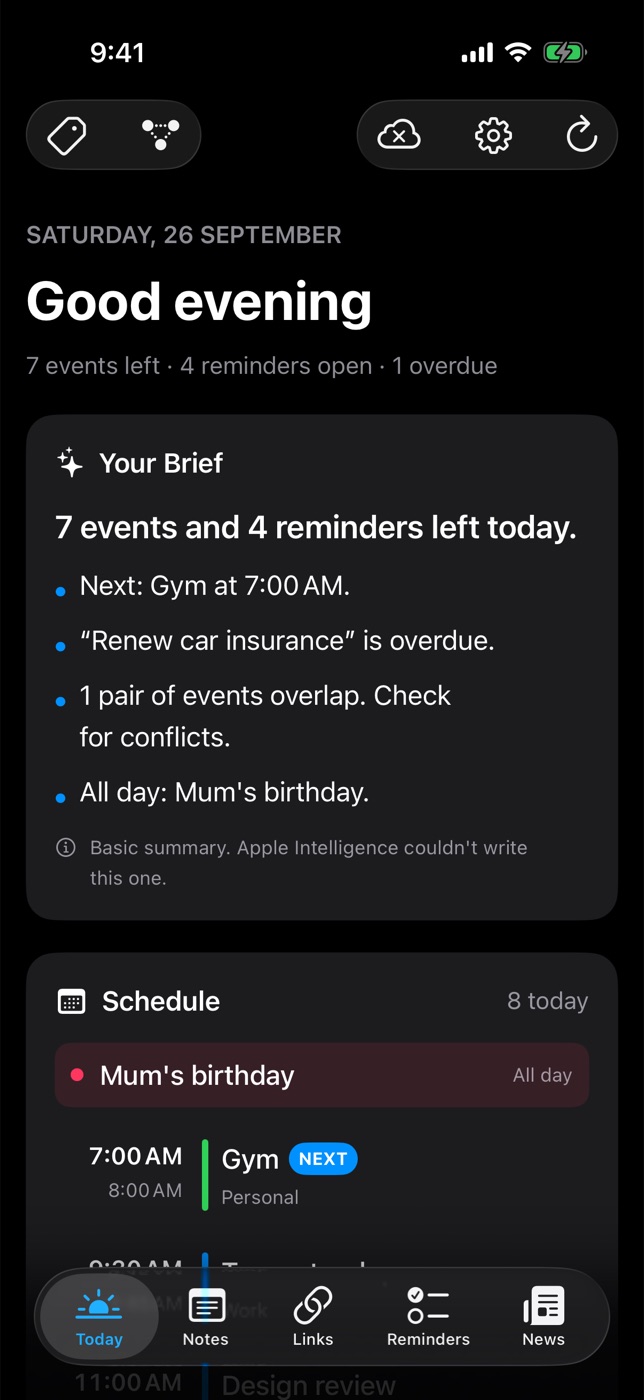
This is exactly what Daily Dash's Today screen is built for. Your Brief sums up the day in a few lines: your next event, anything overdue, events that clash. Below it, the Schedule marks what's next and flags overlaps, and Reminders lists everything due today and overdue, from both Apple Reminders and the app's own reminders, so you can tick things off right there. The brief is written on your device by Apple Intelligence, so your day isn't sent anywhere to be summarised.
Two minutes, one screen, then close the app and start on your first task. For more on building the rest of your morning around this, see a productive morning routine for work.

Your day, on one screen
Daily Dash brings your calendar, reminders, notes and links together with a short brief of what matters today. No account, no tracking. Coming soon to the App Store. See how Today works →
When the day goes sideways
Some days, the plan dies by 10 AM. A production issue, a sick child, a surprise deadline. That's fine; planning isn't about predicting the day, it's about knowing what to protect when it changes.
When it happens, replan once, around midday, in two minutes:
- Which of your top three can still happen today? Protect that one.
- Move the others to tomorrow now, with a date, so they don't silently vanish.
- Drop anything from the “if there's time” list that no longer matters.
Don't replan every hour. Constant replanning is just a more organised way of being reactive.
A copy-paste planning template
If you'd like a written plan, paste this into a note each evening. In Daily Dash, keep a “Daily plans” page and add each day as a sub-page with /, so they nest neatly and don't clutter your notes list.
## Plan for ________

### Top three
- [ ]
- [ ]
- [ ]

### If there's time
- [ ]
- [ ]

### Calendar notes
- Prep needed for:
- Clashes / travel:

### Parked for later
-
At the end of the week, skim the pages. Which top-three items kept slipping? Those are the ones to talk about in your weekly review.
FAQ
Night before or morning: which is better?
Both, in different sizes. Plan properly the night before while you have context, then do a two-minute check in the morning to catch anything that changed.
How many tasks should I plan per day?
Three priorities plus a short list of small tasks for the gaps. If your top three don't fit in your free time, the list is too long.
How long should daily planning take?
About ten minutes in the evening and two in the morning. If it takes longer, you're probably reorganising rather than deciding.
What if I forget to plan?
Anchor it to something you already do at the end of the day: closing your laptop, the commute home, or setting your alarm. A reminder at the same time each workday helps while the habit forms; a repeating Apple Reminder shows up on Daily Dash's Today screen too.