 Daily Dash
Home › Alternatives › Structured
A Structured alternative: a daily planner with notes and news
Structured and Daily Dash both answer “what does my day look like?” They answer it differently. Structured lays your day out as a visual timeline you plan into. Daily Dash gathers your calendar, reminders, notes, links and news onto one screen and writes a short brief. Here's a fair comparison, including when Structured is the better pick.
What people like about Structured
Structured is one of the best-known planner apps on the App Store. As of September 2026, from its website and App Store listing:
- A visual timeline. Every task is a coloured block on a vertical schedule, so you can see how the day fits together.
- Drag-and-drop planning, an inbox for ideas, subtasks and notes on tasks, and a focus timer.
- Structured Pro connects your calendars and Reminders, adds recurring tasks and routines, AI day planning, and a Replan feature for missed tasks. It's sold monthly, yearly or as a lifetime purchase.
- Widgets and Live Activities.
- Many platforms: iPhone, iPad, Mac, Apple Watch, plus Android and the web.
What Daily Dash offers
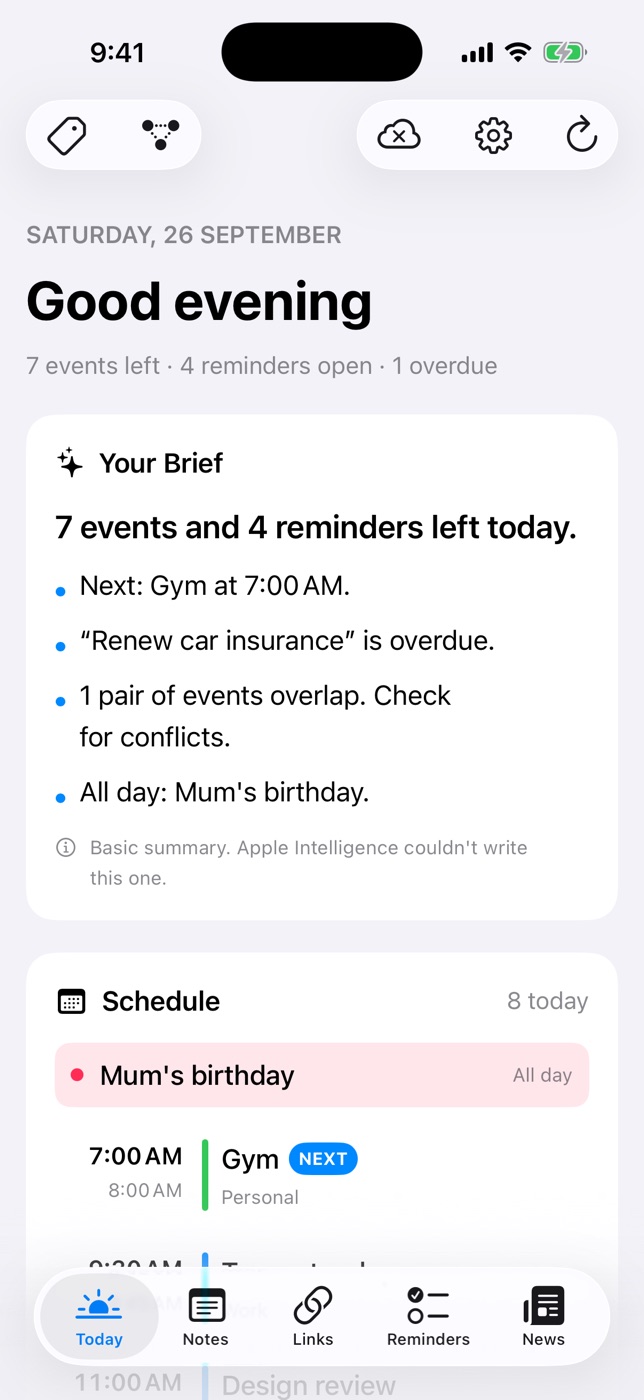
Daily Dash is a daily dashboard plus a personal library, on iPhone, iPad, Mac and Apple Watch.
- Today starts with Your Brief: a few lines on your next event, busy stretches, free time, what's overdue, what overlaps and tomorrow's first event. Apple Intelligence writes it on your device, with a rule-based summary when that's unavailable.
- Schedule lists every event from all your calendars, marks what's Now and Next, and flags overlaps.
- Reminders from Apple Reminders and Daily Dash's own, with quick add that understands “Call mom tomorrow at 5pm #family !!” and location reminders like “buy milk when I leave work”.
- Notes as nested pages stored as Markdown, with locked notes behind a PIN.
- Links saved for offline reading, with on-device summaries.
- News from your feeds and Google News topics, ranked on your device.
- Tags and connections across everything, including calendar events.
- Private: no account, no ads, no analytics. The library syncs through your iCloud.
Side by side
Structured details as of September 2026, from its website and App Store listing.
| Structured | Daily Dash | |
|---|---|---|
| Core idea | Visual timeline planner | Daily dashboard and library |
| Day view | Tasks as blocks on a timeline | Brief, schedule list, reminders list |
| Calendar and Apple Reminders | With Pro | Yes |
| Recurring tasks | With Pro | Via Apple Reminders only |
| AI | AI day planning (Pro) | On-device brief and summaries |
| Focus timer | Yes | No |
| Widgets | Yes | No |
| Location reminders | — | Yes, iPhone and iPad |
| Notes library | Notes on tasks | Nested Markdown pages, locking |
| Read-later and news | — | Links and News |
| Platforms | Apple devices, Android, web | iPhone, iPad, Mac, Apple Watch |
Choose Structured if…
- You think visually and want to see the day as blocks of time.
- You plan by dragging tasks into slots, or you time block every day.
- You rely on repeating routines inside your planner.
- You want AI to draft your schedule, or a focus timer built in.
- You want Home Screen widgets.
- You need Android or a web app.
Those are real strengths, and Daily Dash doesn't try to match them.
Choose Daily Dash if…
- Your plan already lives in Apple Calendar and Apple Reminders, and you want one screen that reads it back to you.
- You want a short written brief each morning, made on your device.
- You want notes, saved articles and news next to your day, connected by the same tags.
- You want location reminders and a quick add that understands plain sentences.
- You'd rather have no account and keep everything in your own iCloud.
How to switch, or use both
- Keep your calendar as the source of truth. Events show up on Today automatically once you allow Calendars.
- Move routines to Apple Reminders. Daily Dash's own reminders don't repeat, but repeating Apple Reminders appear on Today and can be ticked off there.
- Re-add one-off tasks with quick add in the Reminders tab. Anything without a date is due today.
- Move task notes into pages. Longer notes belong in Notes, connected to the reminder or event they support.
- Or run both. Plan the timeline in Structured and use Daily Dash for the brief, notes, links and news.
For a planning routine that works with either app, see how to plan your day in 10 minutes.

Your whole day on one screen
Daily Dash brings your calendar, reminders, notes, links and news together and writes a short brief on your device. No account, no ads. Coming soon to the App Store for iPhone, iPad, Mac and Apple Watch. See how Today works →
FAQ
Is Daily Dash a timeline planner like Structured?
No. Daily Dash shows your day as a brief, a schedule list and a reminders list on one Today screen. It doesn't lay tasks out as blocks on a visual timeline. If a timeline is what you want, Structured is built around it.
Does Daily Dash work with Apple Calendar and Apple Reminders?
Yes. Today shows events from all your calendars and your Apple Reminders alongside Daily Dash's own reminders, and ticking off an Apple Reminder in Daily Dash marks it done in the Reminders app too.
Does Daily Dash support repeating tasks?
Daily Dash's own reminders don't repeat. Repeating Apple Reminders still show up on Today, so you can keep routines in Apple Reminders.
Can I use Structured and Daily Dash together?
Yes. Some people plan the shape of the day in a timeline app and use Daily Dash for notes, saved links, news and a morning brief.