Blog › Notes
A Notion alternative for iPhone: fast, offline and private
Notion is brilliant at a desk. On a phone, in a lift, with one bar of signal and a thought you need to catch in the next ten seconds, it can feel like a lot of app for a little note. If that's you, you don't necessarily need to quit Notion. You might just need a second tool that's built for the phone in your hand. Here's how to tell, and what to look for.
Where Notion shines
It's worth being honest about what Notion does well, because if these are the reasons you use it, you should probably keep it:
- Databases. Tables, boards, calendars and galleries built on the same data, with filters, relations and formulas. Nothing on this list matches that.
- Teams. Shared workspaces, permissions, comments and wikis that a whole company can live in.
- Everywhere. A web app plus apps on Mac, Windows, iPhone and Android. If you switch between a work PC and an iPhone, that matters.
- Templates and integrations. A huge community of ready-made setups, and connections to lots of other tools.
If your notes are really a project tracker shared with five colleagues, a phone-first notes app isn't a replacement. It's a different thing.
Where it frustrates on a phone
The complaints people have about Notion on iPhone tend to cluster around the same few things:
- Speed to capture. The time from tapping the icon to typing the first word matters more on a phone than anywhere else. A cloud-first app has more to load before it's ready.
- Patchy connections. Notion has been working on offline access, but it's designed around the cloud. Trains, planes and basements are where you notice.
- Too much structure for small things. A grocery list, a thought from a walk, a reminder to call someone: none of these want a database.
- Privacy. Your workspace lives on Notion's servers. That's normal for a collaboration tool, but for a private journal or personal notes, some people would rather their data sit only on their own devices and their own iCloud.
- Notes, but not the rest of your day. Your calendar and reminders live in other apps, so the phone becomes a lot of switching.
What to look for in an alternative
Before comparing apps, decide which of these you actually care about:
- Local-first. Notes stored on the device open instantly and work anywhere, then sync when they can.
- Pages inside pages. If you liked Notion's nesting, you'll miss it in apps that only have folders.
- Slash commands and a clean editor. Typing / for a heading or a checklist is hard to unlearn.
- Links between pages. And ideally backlinks, so a page shows what points to it.
- An exit. Markdown export means your notes are never trapped.
- Platforms you use. Apple-only apps can be more polished on Apple devices, but they're a dead end if you also use Windows or Android.
The main options
A quick, fair lay of the land. All of these are good; they're good at different things.
- Apple Notes. Free, fast, already on your phone, with folders, tags, links between notes and locking. No nested pages or slash commands, and it's only on Apple devices plus iCloud.com.
- Obsidian. Plain Markdown files you own, powerful linking, a graph view and a big plugin ecosystem. Loved by tinkerers. Syncing to iPhone takes a little setup unless you pay for Obsidian's sync.
- Craft. Beautiful documents with nested pages and a strong Apple focus. Closest in feel to Notion's page model.
- Bear. A lovely Markdown writing app with tags for organising. Great for writers; not built around nested pages.
- Daily Dash. Notion-style pages alongside your calendar, reminders, saved links and news, on Apple devices only. More on it below.
If you want to go deeper on organising ideas across apps, our guide to building a second brain on iPhone covers tags, folders and links in detail.
Notion-style pages in Daily Dash
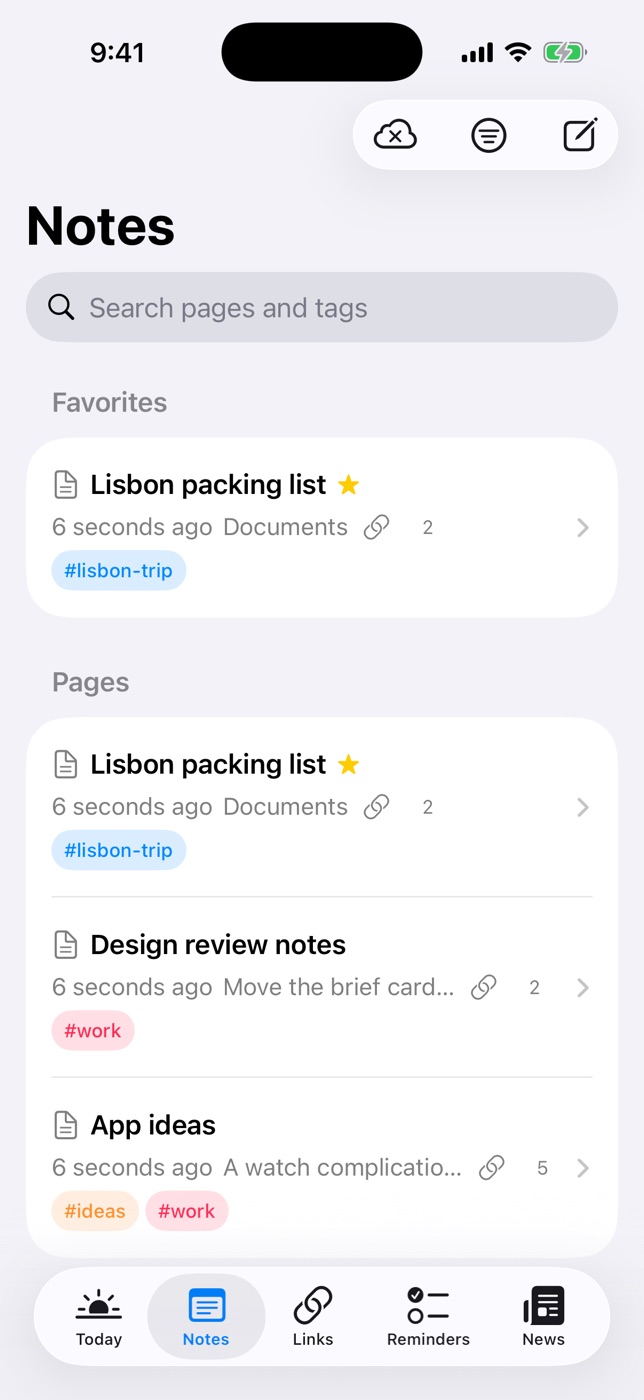
Daily Dash started as a dashboard for your day, and its Notes tab grew into something that will feel familiar to Notion users, just smaller and faster:
- Pages inside pages. Nest as deep as you like, give pages emoji icons, and use breadcrumbs to climb back up. Drag to reorder or nest, or use Move To.
- Slash commands. Type / at the start of a line for headings, bulleted, numbered and check lists, quotes, code, a divider, a new sub-page, or a link to another page. The same blocks are on the Aa panel if you prefer tapping.
- Embedded sub-pages. Pages you embed show as tappable blocks whose titles stay current when you rename them.
- Backlinks. Each page lists the pages that link to it, so connections work in both directions.
- Favorites and Trash. Star a page to pin it. Deleted pages, and their sub-pages, sit in the Trash for 30 days.
- Markdown underneath. Notes are stored as Markdown with a rich-text editor on top. Flip to the Markdown source any time, and export a note as Markdown (with tags and dates as front matter) or as a PDF.
- Locked pages. Set a PIN in Settings, add Face ID or Touch ID, and lock any page. Locked notes are encrypted with a key protected by your PIN. More in our guide to locking notes on iPhone.
What makes it different from a pure notes app is that notes share one set of tags with everything else: links, reminders, news feeds, calendar events and Apple Reminders. You can also connect any item to any other, like a trip page to its flight reminder and hotel link, and walk those connections in the Graph.
And it's private by design. There's no Daily Dash account and no server of ours. Your library syncs through your own iCloud across iPhone, iPad and Mac.

Try Notion-style pages on your iPhone
Nested pages, slash commands and backlinks, next to your calendar and reminders. No account, no ads, synced through your own iCloud. See how notes work →
To be clear about the limits: Daily Dash has no databases, no shared workspaces and no web or Windows version. If you need those, Notion is still the right tool for that part of your life.
How to switch without losing a weekend
The biggest mistake is trying to migrate everything at once. Most of what's in an old workspace is archive you'll never open again. Instead:
- Leave the archive where it is. Notion keeps working. Old pages can stay there, read-only in your head.
- Move only what's active. The five to ten pages you touch every week: current projects, a running journal, lists you actually use. Copy them across by hand, which doubles as a clean-up.
- Split by job. Shared team docs stay in Notion. Personal notes, quick capture and anything private go to the phone-first app.
- Rebuild structure lightly. Start with a few top-level pages (Projects, Areas, Journal, Reference) and let the rest grow. Tags do more work than deep folders.
- Give it two weeks. Use the new app for all new notes. If you haven't opened Notion for personal things in a fortnight, the switch is done.
FAQ
Should I stop using Notion?
Not if you rely on databases, share workspaces with a team, or work in a browser on Windows or Linux. Plenty of people keep Notion for shared work and use a faster, private app for personal notes on their phone.
What's the best offline Notion alternative for iPhone?
Local-first apps like Apple Notes, Obsidian, Bear and Daily Dash open instantly and work without a connection. Choose by whether you want plain Markdown files, a polished editor, or notes combined with your calendar and reminders.
Can I move my notes out of Notion?
Notion can export pages as Markdown or HTML. Most people find it easier to move only active pages by hand and leave the rest.
Does Daily Dash work on Windows or the web?
No. It's built for iPhone, iPad, Mac and Apple Watch and syncs through iCloud. If you need other platforms, a cross-platform app is a better fit.