 Daily Dash
Daily Dash vs Apple Notes
Apple Notes is one of the best apps Apple makes. It's free, it's everywhere, and it handles photos, scans and sketches with ease. Daily Dash takes a different angle: text pages that nest inside each other, stored as Markdown, tagged with the same tags as your reminders, links and calendar. Here's how they compare, as of September 2026, and when each one is the right home for a note.
The short answer
- Pick Apple Notes if your notes are full of photos, PDFs, scanned documents or handwriting, or you edit notes together with other people.
- Pick Daily Dash if you write mostly text, like to nest pages like a notebook with chapters, want your notes in plain Markdown, and want one set of tags across notes, reminders, links and events.
- Use both if you want Apple Notes as a scrapbook and Daily Dash for the pages you plan and think with.
Side by side
| Apple Notes | Daily Dash | |
|---|---|---|
| Structure | Folders, subfolders, Smart Folders | Pages inside pages, favorites, breadcrumbs |
| Storage format | Apple's own rich format | Markdown, with a source view |
| Markdown export | Yes, since iOS 26 | Yes, with tags and dates as front matter; PDF too |
| Links between notes | Yes | Yes, with backlinks and embedded page blocks |
| Tags | Yes, within Notes | Yes, shared with reminders, links, feeds and events |
| Photos, files, scans | Yes | No, text only |
| Sketching and handwriting | Yes, with Apple Pencil | No |
| Collaboration | Shared notes and folders | No; export to share |
| Locked notes | Device passcode or password | PIN, Face ID or Touch ID; encrypted |
| Text colour, underline | Yes | No (Markdown can't store them) |
| Trash | Recently Deleted, 30 days | Trash, 30 days |
Folders or pages inside pages
Apple Notes organises with folders and subfolders, plus Smart Folders that gather notes by tag, date or other rules. A note is always a leaf; it can't contain other notes.
In Daily Dash, notes are pages, and any page can hold other pages. A “Trip to Lisbon” page can contain “Packing”, “Itinerary” and “Restaurants”, each with its own sub-pages. Give pages emoji icons, drag to reorder or nest, and use the breadcrumbs at the top to climb back up. Favorites pin your most-used pages to the top of the list.
Type / at the start of a line for headings, lists, checklists, quotes, code, a divider, a new page inside this one, or a link to another page. If you're used to Apple Notes on iPad or Mac, its keyboard shortcuts work in Daily Dash too (see the shortcut list).
Markdown and getting your notes out
Since iOS 26, Apple Notes can import and export Markdown files, which is a welcome escape hatch. Notes are still kept in Apple's own format and converted when you export.
Daily Dash stores every note as Markdown. Tap the document button to see the source, styled as you type. The trade-off is that the editor only offers formatting Markdown can store: headings, bold, italic, strikethrough, highlight, inline code, links and lists, but no underline or text colour. Share any note as Markdown, with its tags and dates as front matter, or as a paginated PDF.
Links, tags and connections
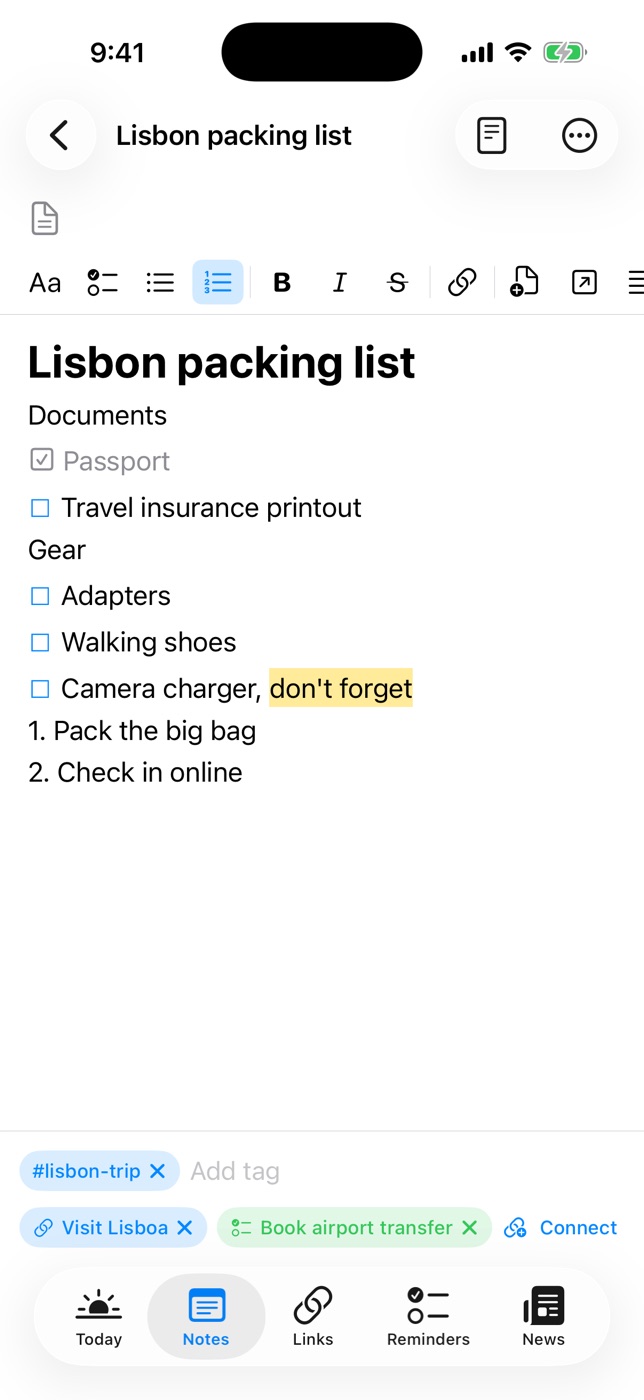
Both apps let you link one note to another and tag notes. The difference is scope. Tags in Apple Notes organise notes. Tags in Daily Dash are shared by everything: notes, links, reminders, news feeds, saved stories, calendar events and Apple Reminders. Tap #house and you see the renovation notes, the contractor's website, the reminder to call them, and Thursday's appointment together.
Connections go one step further. Link a page to a specific reminder, link or event, and the Graph shows everything a page touches. Each page also lists the pages that link to it. If you're building a second brain on iPhone, that's the part that matters.
Photos, scans, sketches and sharing
Here Apple Notes is clearly ahead, and Daily Dash doesn't try to compete. Apple Notes can scan documents with the camera, hold photos, PDFs and other attachments, take handwritten notes and drawings with Apple Pencil, and share a note or folder so others can edit it with you.
Daily Dash notes are text only, and there's no collaboration. You can share a copy as Markdown or PDF, but not edit together.
Locking and privacy
Both apps can lock notes. In Daily Dash you set a notes PIN in Settings and can turn on Face ID or Touch ID. A locked page keeps its title visible while the text is encrypted with a key protected by your PIN. If you forget it, nobody, including us, can recover those notes. Our guide to locking notes on iPhone covers both apps step by step.
Daily Dash has no account and no analytics. Your library syncs through your own private iCloud.

Pages that fit around your day
Daily Dash is coming soon to the App Store for iPhone, iPad, Mac and Apple Watch (iOS 26 and later). No account, no ads, no tracking. See how notes work →
FAQ
Can Daily Dash import my Apple Notes?
No, there's no import tool. Copy the notes you actively use into new pages and leave the archive in Apple Notes.
Can I add photos or sketches to Daily Dash notes?
No. Notes are text pages stored as Markdown. Use Apple Notes for photos, scans and drawings.
Can both apps lock notes?
Yes. Daily Dash uses a PIN with optional Face ID or Touch ID, and encrypts the note text. Apple Notes uses your device passcode or a separate password.
Can I get my Daily Dash notes out again?
Yes. Share any note as Markdown, with tags and dates as front matter, or as a PDF.