 Daily Dash
Home › Alternatives › Pocket
A Pocket alternative for iPhone with no account
If Pocket was your “read it later” drawer, you lost more than an app when it closed. You lost a list that lived on someone else's server. Daily Dash keeps saved articles on your iPhone for offline reading and syncs them through your own iCloud, with no account to create. This page is for former Pocket users deciding whether it fits.
Looking for a broader list of read-later apps? Our blog post The best Pocket alternative is a read-later habit you'll actually clear compares the main options and covers the habit side. This page is narrower: why Daily Dash, specifically, for someone who used Pocket on iPhone.
What happened to Pocket
Mozilla shut Pocket down on 8 July 2025. Users could export their saves until 8 October 2025, and after that the data was gone. As of September 2026 there's no official successor from Mozilla.
If you exported in time, you have a file with your saved links. If you didn't, those saves can't be recovered. Either way, the lesson is the same one many Pocket users took away: a reading list is only as safe as the place it's stored.
What people liked about Pocket
- Saving from anywhere. A browser button and a share sheet option made saving a one-tap habit.
- A clean reading view. Articles without ads, pop-ups and cookie banners.
- Offline reading on the phone. Saved articles were there on the train or the plane.
- Tags. A simple way to group what you'd saved.
- It was free for the basics, with a paid tier for extras.
What Daily Dash offers instead
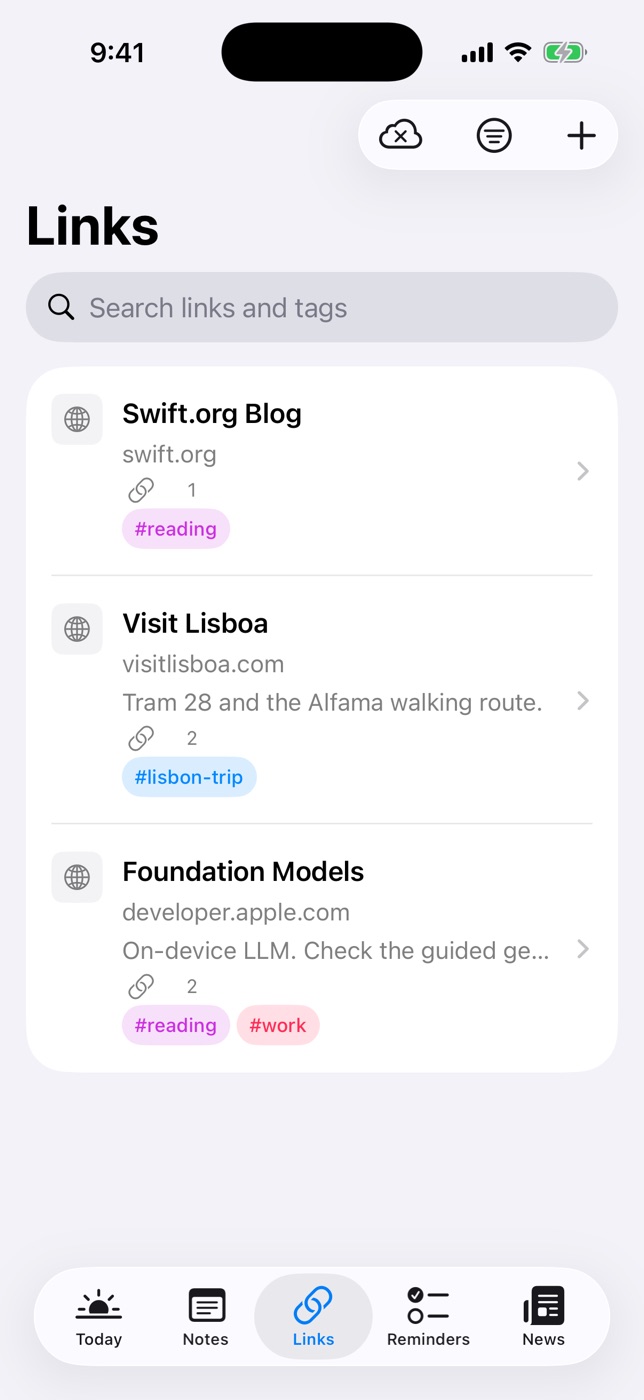
Daily Dash is a daily dashboard for iPhone, iPad, Mac and Apple Watch. Its Links tab covers the core Pocket job:
- Offline copies. When you save a link, the title and icon are fetched, and the article's text and a few images are saved on the device. Tap Read for the reader view or Open Link for the full page.
- No account. Your links sync through your private iCloud. There's no Daily Dash server, no sign-up and no ads.
- Short summaries. Recent links get a summary under the title, written on your device. It makes pruning a long list quick.
- Notes, tags and connections. Each link has its own note. Tags are shared with your notes, reminders and feeds, and you can connect a link to the note or reminder it belongs to.
- Next to your day. Links sit in the same app as your calendar, reminders, notes and news feeds. Save a story from the News reader to Links to keep it for good.
Two honest gaps. Daily Dash has no Safari extension or share sheet button, so you save by pasting a link into Links or saving from the News reader. And it has no import, so a Pocket export can't be loaded in one go.
Side by side
Pocket details describe the service before it closed, as of September 2026.
| Pocket (closed July 2025) | Daily Dash | |
|---|---|---|
| Status | Shut down; export ended 8 Oct 2025 | Coming soon to the App Store |
| Account | Required (Mozilla/Pocket account) | None; uses your iCloud |
| Where your list lives | Pocket's servers | Your devices and your private iCloud |
| Offline reading | Yes, in the apps | Yes, text and images saved on device |
| Save from browser or share sheet | Yes | No; paste a link or save from News |
| Import | — | No |
| Summaries | — | On device, for recent links |
| Notes on a saved link | — | Yes, rich text |
| Platforms | Was cross-platform | iPhone, iPad, Mac, Apple Watch |
Who should pick what
Pick Daily Dash if you're on Apple devices, save a modest number of articles, and want them next to your calendar and to-dos with no new account. It suits people who read on the commute and prune weekly.
Pick a dedicated read-later app if you save dozens of articles a day from Safari, rely on highlights, need Android or Windows, or want a one-click import of your Pocket export. The blog comparison covers those options, and our Omnivore alternative page covers similar ground for Omnivore users.
How to move what matters
There's no import, so treat the switch as a fresh start. It's usually quicker than it sounds, because most of an old reading list never gets read.
- Open your export. If you downloaded your Pocket data before October 2025, open the file on your Mac or in the Files app.
- Pick ten. Scan the titles and mark the articles you would still open today. Reference pieces, recipes and long reads you meant to finish are good candidates.
- Paste them into Links. In Daily Dash, tap + in Links and paste each URL. The title, icon and an offline copy are fetched for you.
- Add a line of context. Write why you kept it in the link's note, and add a tag you already use, like #work or #trip.
- Let the rest go. Keep the export file as an archive if you like. You can search it later if something comes up.
For a routine that stops the new list turning into the old one, see how to read articles offline on iPhone and the habits section of our Pocket alternatives post.

Keep your reading list in your own iCloud
Daily Dash saves links for offline reading, summarises them on your device and keeps them next to your day. No account, no ads, no tracking. Coming soon to the App Store for iPhone, iPad, Mac and Apple Watch. See how Links works →
FAQ
Can I import my Pocket export into Daily Dash?
No. Daily Dash has no import tool. If you kept your Pocket export, open it, pick the articles you still want and paste those links into the Links tab one at a time.
Do I need an account to use Daily Dash?
No. Your links, notes and reminders sync through your own private iCloud. There's no Daily Dash account and no Daily Dash server holding your reading list.
Can I read saved articles offline?
Yes. When you save a link, Daily Dash stores the article's text and a few images on the device. Tap Read for the clean reader view, with or without a connection.
Does Daily Dash have a Safari extension or share sheet button?
Not at the moment. You save a link by tapping + in Links and pasting the URL, or by saving a story from the News reader.
Is Pocket coming back?
As of September 2026, no. Mozilla shut Pocket down on 8 July 2025, and the data export window closed on 8 October 2025.